
You’ve probably already noticed your Smartphone Overheating Explained getting warm while gaming, charging, using mobile data, or running demanding apps. However, not every increase in temperature means something is wrong, and the cause can vary significantly depending on what your phone is doing. In this guide, we’ll explain why smartphones overheat, how CPU usage, gaming, charging, and network activity contribute to heat, and how to troubleshoot the problem safely.
Key Takeaways
- Smartphone overheating occurs when the device generates or retains more heat than its thermal system can effectively dissipate.
- CPU and GPU workloads, gaming, charging, background apps, video processing, and network activity can all increase smartphone heat.
- Fast charging can produce noticeable warmth because electrical energy is converted into stored battery energy with some energy released as heat.
- Weak cellular signals can increase modem activity and power consumption, potentially contributing to additional device heat.
- Battery usage information, app activity, charging behavior, and usage patterns can help identify the source of excessive heat.
- Reducing demanding workloads, improving ventilation, updating software, and managing background activity can help prevent unnecessary overheating.
- Persistent extreme heat, swelling, unusual battery behavior, or repeated thermal shutdowns should be treated as warning signs requiring further attention.
What Is Smartphone Overheating and How Is It Different From Normal Phone Warmth?
Smartphone overheating is a condition in which a phone’s internal components generate or retain more heat than its thermal-management system can effectively dissipate. Normal warmth is different because smartphones naturally produce heat when their processors, display, battery, cameras, radios, or charging systems consume power.
For example, Apple states that an iPhone can become warm during wireless charging, processor-intensive apps, graphics-intensive games, high-quality video streaming, camera use, setup, and major software updates. These conditions can be normal when the device cools afterward.
How Does a Smartphone Generate Heat?
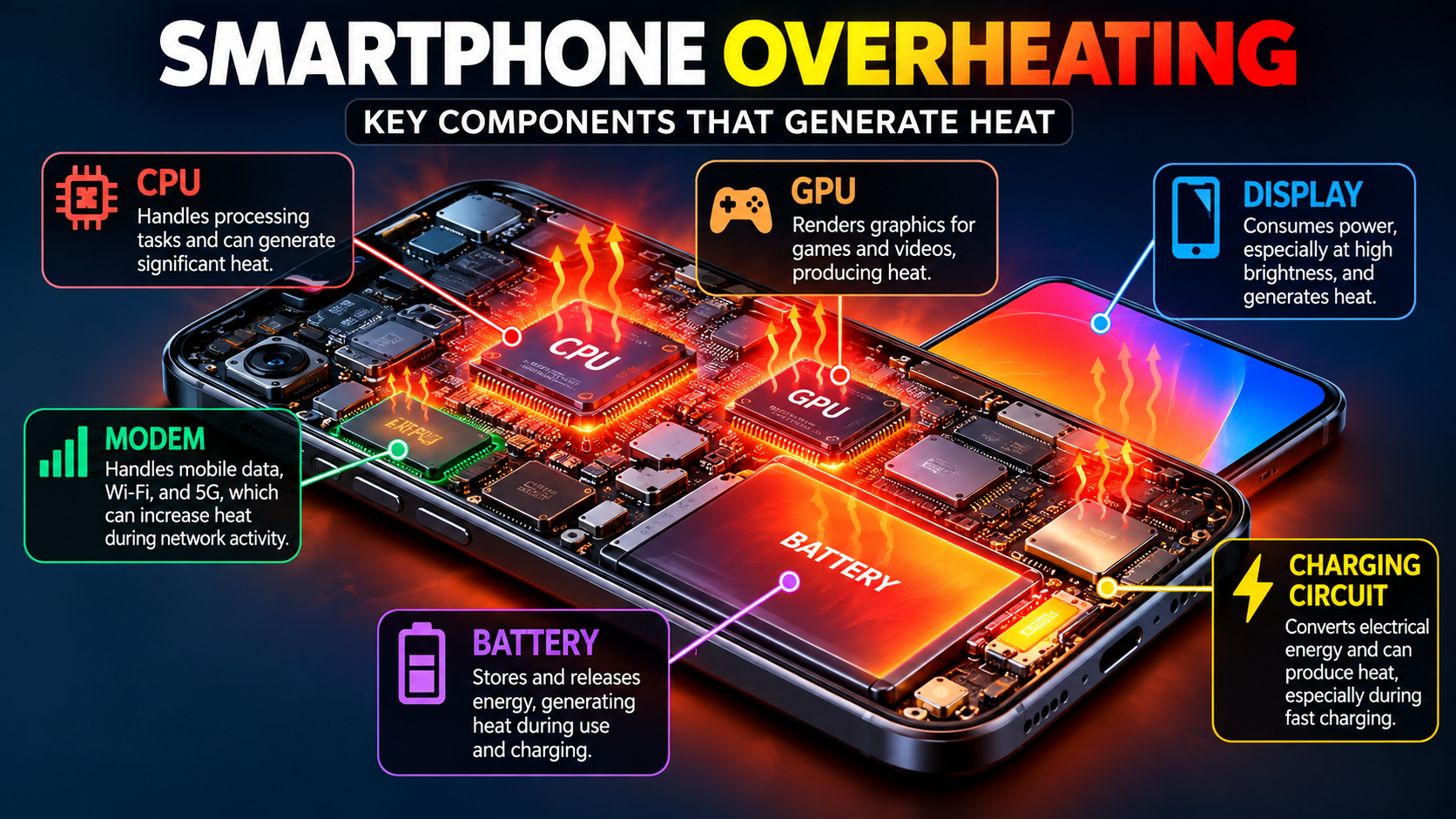
Smartphone heat is primarily a by-product of electrical power consumption and processing activity. The CPU and GPU consume energy when applications perform calculations, while the display and wireless radios also require power during use.
For example, playing a graphics-heavy game can simultaneously increase CPU and GPU activity, refresh the display continuously, communicate with online servers, and produce audio output. The combined workload can make the phone noticeably warmer than reading an article or sending a text message.
Moreover, the battery and charging circuitry can become warm during charging. Apple’s battery guidance explains that an iPhone battery warms during charging and that charging current can be reduced as the battery approaches full charge to help manage heat.
What Temperature Is Too Hot for a Smartphone?
There is no single universal temperature that applies to every smartphone because manufacturers design different devices with different thermal limits. The manufacturer’s temperature guidance and the phone’s own thermal warnings are more useful than relying on one universal number.
For example, Apple states that iPhone and iPad devices are designed to operate in ambient temperatures between 0°C and 35°C, while storage is specified between -20°C and 45°C. Apple also warns that using an iPhone in very hot conditions can permanently shorten battery life.
Why Does Smartphone Overheating Matter?
Smartphone overheating matters because excessive heat can affect performance, charging behavior, battery longevity, and normal device operation. Modern phones contain thermal-management systems that can automatically reduce performance or charging activity when temperatures become too high.
For example, Apple explains that an overheated iPhone may dim its display, slow or stop charging, weaken mobile radio performance, reduce application performance, or temporarily disable certain camera features.
Can Heat Damage a Smartphone Battery?
Heat can accelerate battery aging and increase battery drain. Google specifically advises Android users to avoid situations in which their phones overheat because a hot battery can drain faster and may be damaged by prolonged heat exposure.
For example, leaving a phone in direct sunlight inside a parked car can expose it to much higher temperatures than ordinary indoor use. Combining that environmental heat with charging or gaming adds another source of thermal load.
Additionally, rechargeable lithium-ion batteries naturally lose capacity as they chemically age. Apple explains that battery aging reduces the amount of charge a battery can hold and can affect its ability to deliver peak power.
Why Does Thermal Throttling Happen?
Thermal throttling is a protective mechanism that reduces device performance or power consumption when internal temperatures become too high. This allows the phone to control heat instead of continuing to operate at maximum performance.
For example, a demanding game may initially run at a high frame rate but later become less responsive after prolonged play because the device reduces performance to manage heat. Apple similarly notes that excessive internal temperature can result in lower frame rates and longer processing times.
Why Does My Phone Get Hot Even When I Am Not Using It?
A phone can become hot while appearing idle because background applications, synchronization, downloads, location services, backups, updates, or network processes may continue consuming power. The exact cause depends on the operating system, applications, settings, and device model.
For example, a cloud backup, photo synchronization process, large download, or recently installed application may continue working after you stop actively using the phone. Checking battery-usage information can help identify unusual background consumption.
Moreover, Google recommends restricting apps with high battery use and using battery-management features such as Adaptive Battery on supported Android devices.
Can Background Apps Cause Phone Overheating?
Background apps can contribute to heat when they perform sustained processing, location tracking, synchronization, media processing, or network communication. However, not every background app is problematic, so users should identify abnormal activity rather than force-close every application.
For example, a navigation app that continuously accesses GPS can use more power than a simple calculator app. Similarly, a social-media application uploading videos can temporarily create higher processor and network activity.
Why Does My Phone Get Hot After a Software Update?
A phone may temporarily become warmer after a major software update because system processes can continue working after installation, including indexing, optimization, synchronization, and other background tasks. Apple specifically lists completing a software update as a situation in which an iPhone may become warm.
For example, if you install a major update and immediately restore photos or applications, several resource-intensive processes can overlap. In that situation, temporary warmth does not automatically indicate a hardware fault.
Can High CPU Usage Cause a Smartphone to Overheat?
High CPU usage can cause a smartphone to become warmer because the processor consumes additional electrical power while performing more computational work. The amount of heat depends on the workload, processor architecture, software efficiency, device design, ambient temperature, and other components operating simultaneously.
For example, video editing, AI processing, large file compression, multitasking, and demanding games can keep processor cores active for extended periods. A short burst of high CPU usage is usually less concerning than sustained high activity combined with excessive temperature.
What Does High CPU Usage Mean on a Phone?
CPU usage describes how actively the phone’s processor is performing computational tasks. High CPU usage means that applications or system processes are demanding a relatively large amount of processor resources.
For example, decoding high-resolution video requires more processing than displaying a static webpage. Likewise, an application performing continuous calculations can keep processor cores busy even when the screen appears relatively unchanged.
At the same time, CPU usage alone does not prove that the CPU is the source of overheating. A phone can also become warm because of its GPU, modem, display, battery, charging circuitry, or environmental conditions.
How Can You Identify an App Using Too Many Resources?
You can identify a potentially problematic application by checking battery usage, recent activity, and whether the overheating consistently occurs after using that application. Android devices provide battery-management controls, although exact menus vary by manufacturer and software version.
For example, if one application repeatedly appears near the top of battery consumption and the phone becomes hot whenever that application runs, it becomes a useful suspect. You can then update the application, restrict background activity, restart the phone, or temporarily uninstall it to test whether the behavior changes.
Why Does My Phone Get Hot While Gaming?
Gaming makes a smartphone warmer because 3D games can simultaneously place substantial demands on the CPU, GPU, display, memory, battery, and network connection. The longer the demanding workload continues, the more heat the device may need to dissipate.
For example, a high-frame-rate multiplayer game can combine complex graphics rendering with continuous internet communication and a bright, high-refresh-rate display. That workload can produce significantly more heat than reading messages or browsing a simple webpage.
Apple identifies graphics-intensive games among activities that can make an iPhone warm, while Google similarly lists gaming among activities that can increase Pixel phone temperature.
Does Playing Games While Charging Increase Heat?
Playing demanding games while charging can increase total thermal load because the phone is processing a heavy workload while simultaneously receiving electrical energy through its charging system.
For example, a phone running a demanding game while connected to a fast charger may become considerably warmer than the same phone performing either activity separately. Google specifically advises avoiding resource-intensive activities while charging when overheating is a concern.
How Can You Reduce Heat While Gaming?
You can reduce gaming-related heat by lowering the workload placed on the device. Useful adjustments include:
- Reduce graphics quality when maximum graphics are unnecessary.
- Lower the frame-rate setting if your game supports it.
- Reduce screen brightness when practical.
- Avoid playing demanding games while fast charging.
- Remove the phone from direct sunlight.
- Use a well-ventilated environment.
- Close unnecessary resource-intensive activities.
- Take breaks during long gaming sessions.
Moreover, reducing graphics settings does not necessarily mean sacrificing the gaming experience. A slightly lower graphical workload can sometimes provide more consistent performance over a longer session.
Does Fast Charging Make a Smartphone Overheat?
Fast charging can make a smartphone warmer because charging involves electrical energy moving into the battery, while charging circuitry also produces heat as part of the energy-conversion process. Modern smartphones use software and hardware controls to manage charging when temperatures rise.
For example, Apple explains that iPhone charging can slow or pause when the device becomes too warm, and charging resumes after the temperature returns to an appropriate range.
Is It Normal for a Phone to Get Warm While Charging?
A moderate increase in temperature while charging can be normal. Charging-related warmth becomes more important when it is excessive, persistent, accompanied by a warning, or combined with a hot environment or heavy device usage.
For example, wireless charging can make an iPhone warmer, and Apple explicitly lists wireless charging as a situation in which users may notice increased warmth.
Should You Use Your Phone While It Is Fast Charging?
You can use a phone while charging, but avoiding demanding activities during charging can reduce the combined thermal workload. Activities such as gaming, long video recording, navigation, or intensive video calls can add processing and display heat while the battery is already charging.
For example, replying to messages during charging creates a much smaller workload than running a graphics-intensive game for an hour. The practical goal is not to avoid all phone use during charging but to avoid unnecessary high-load activity when the device is already hot.
Why Does My Phone Get Hot While Using Mobile Data or 5G?
Mobile network activity can contribute to smartphone heat because the cellular modem and supporting components consume power when transmitting and receiving data. Network conditions, data volume, signal strength, and the type of activity all influence the overall workload.
For example, streaming high-resolution video over a cellular connection combines sustained network activity with continuous video decoding and display use. Google identifies substantial mobile-data transfers among activities that can make Pixel phones warm.
Can a Weak Signal Cause Phone Overheating?
A weak cellular signal can contribute to increased power consumption because the phone may need to work harder to maintain communication with the network. Network conditions are therefore one factor worth considering when overheating occurs primarily during cellular use.
For example, a phone may remain relatively cool on a strong Wi-Fi connection but become warmer while downloading large files in an area with poor cellular reception. This does not prove that weak signal strength is the sole cause, but it provides a useful troubleshooting clue.
Is Wi-Fi Better Than Mobile Data for Phone Temperature?
Wi-Fi can sometimes reduce the workload associated with cellular connectivity, although the actual effect depends on the phone, network, signal conditions, and task. The practical approach is to compare identical activities under similar conditions rather than assuming one connection type always produces less heat.
For example, if streaming the same video over Wi-Fi produces substantially less warmth than streaming it over mobile data, network conditions may be contributing to the difference.
What Other Activities Can Make a Smartphone Hot?
Several ordinary activities can increase smartphone temperature because they combine processing, display, camera, location, network, or battery workloads. Heat becomes easier to understand when you connect the temperature increase with the activity happening at the same time.
| Activity | Why It Can Generate Heat | What to Check |
|---|---|---|
| Gaming | CPU/GPU and display workload | Graphics and frame rate |
| Fast charging | Charging circuitry and battery activity | Charger, environment, usage |
| Video recording | Camera sensor and processing | Resolution and recording duration |
| Video calls | Camera, display, CPU and network | Call duration and connection |
| GPS navigation | Location, display and network | Navigation duration |
| Mobile hotspot | Cellular modem and Wi-Fi radios | Connected devices |
| Large downloads | Network and storage activity | Network type and file size |
| High brightness | Display power consumption | Brightness level |
| Software updates | Background processing | Recent update activity |
| Hot environment | Reduced ability to dissipate heat | Ambient temperature |
For example, Google lists video calls, camera recording, streaming, navigation, hotspot use, large mobile-data transfers, and resource-intensive activities during charging as potential contributors to increased Pixel phone temperature.
How Can You Find What Is Causing Your Phone to Overheat?
The most useful way to troubleshoot smartphone overheating is to identify when the heat occurs, check battery and app activity, and determine whether the trigger is workload, charging, network activity, environmental temperature, software, or hardware.
Step 1: Identify When the Heat Starts
First, observe exactly when your phone becomes warm. The timing of the temperature increase is one of the strongest clues to the underlying cause.
For example:
- Hot only during gaming → investigate CPU/GPU workload.
- Hot mainly while charging → investigate charging conditions.
- Hot during mobile-data use → investigate network activity.
- Hot while idle → investigate background apps or hardware.
- Hot outdoors → investigate environmental temperature.
- Hot after an update → allow background processes to finish and monitor behavior.
This simple observation can prevent unnecessary factory resets or application deletions.
Step 2: Check Battery and App Usage
Next, check the phone’s battery settings to identify applications consuming unusually high amounts of power. High battery consumption does not automatically mean an application is defective, but it can reveal which processes deserve further investigation.
For example, an application that suddenly consumes much more battery than usual after an update may deserve closer attention. Updating it, restricting its background activity, or temporarily removing it can help establish whether it contributes to the problem.
Step 3: Compare Different Usage Conditions
Then, reproduce the problem under controlled conditions. Changing one variable at a time makes overheating easier to diagnose.
For example, test the same video-streaming activity over Wi-Fi and mobile data, or compare gaming with and without charging. If the temperature changes significantly when only one variable changes, that variable becomes a stronger candidate.
Step 4: Check the Environment
After that, check whether environmental heat is amplifying the problem. A phone has less ability to dissipate heat when the surrounding environment is already hot.
For example, a gaming session indoors and the same gaming session inside a hot car are not equivalent tests. Apple specifically warns against leaving an iPhone in a hot car or direct sunlight for extended periods.
What Tools and Settings Can Help Diagnose Smartphone Overheating?
Built-in battery, device-diagnostic, and system-management tools are usually the best starting point because they provide information specific to your phone without requiring unnecessary third-party monitoring software.
Android Battery and Device Diagnostics
Android phones vary by manufacturer, but battery settings commonly provide information about battery consumption and applications. Google also provides a Pixel-specific temperature diagnostic on supported devices.
For example, on Pixel 6 and later, Google provides a “Phone is very warm” diagnostic under Settings → Battery → Battery diagnostics.
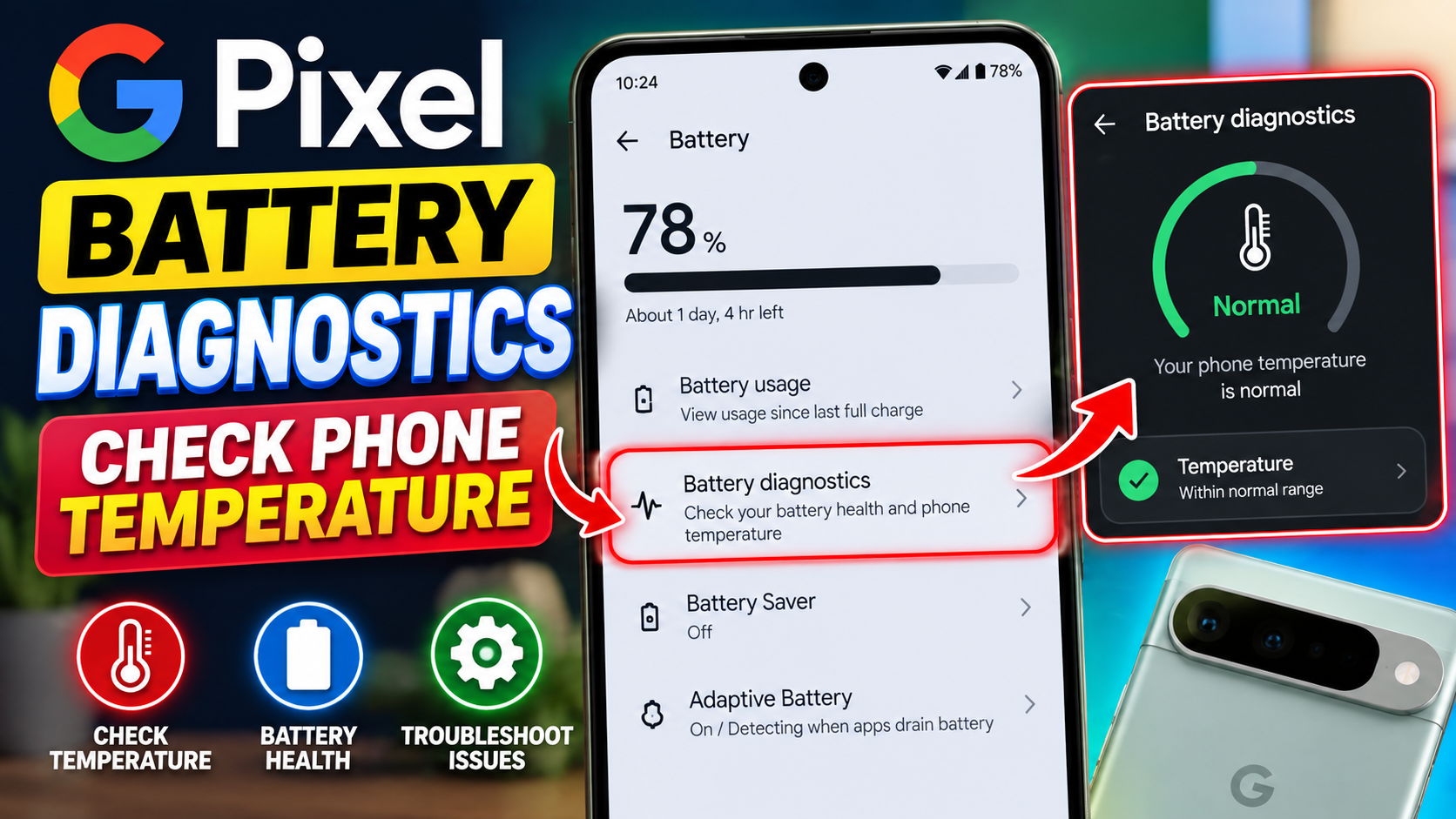
Google also recommends battery-saving measures such as reducing screen brightness, restricting high-battery-use apps, and using Adaptive Battery where supported.
iPhone Battery and Temperature Management
iPhones automatically manage charging and performance when temperatures become excessive. An iPhone may slow or pause charging, dim the display, reduce performance, or display a temperature warning when internal temperatures exceed normal operating conditions.
For charging specifically, Apple explains that iPhone charging may slow after approximately 80% and can pause under extreme temperature conditions.
What About Third-Party Phone Cooling Apps?
Third-party temperature or battery-monitoring applications can provide additional information on some Android devices, but you should not assume that an app claiming to “cool” your phone can physically remove heat from the hardware.
For example, an application can display sensor readings or help identify battery consumption, but it cannot replace proper thermal design, ventilation, software optimization, or a functioning battery.
How Can You Safely Cool Down an Overheating Smartphone?
You can safely cool an overheating smartphone by stopping demanding activities, disconnecting it from charging when appropriate, moving it away from direct heat, and allowing it to cool naturally.
What Should You Do Immediately?
First, stop activities that are generating substantial heat. Gaming, video recording, navigation, hotspot use, and intensive downloads should be paused if the phone is already excessively warm.
Second, disconnect the phone from its charger if it is charging and overheating. Google recommends disconnecting a very warm Pixel phone from its power source and moving it to a cooler location until it has cooled.
Third, remove the phone from direct sunlight or a hot environment. A cooler environment gives the device a better opportunity to dissipate heat naturally.
Fourth, avoid extreme cooling methods such as placing the phone in a freezer or exposing it to sudden temperature changes. Rapid temperature changes can create additional risks, including condensation.
Should You Remove the Phone Case?
Removing a case can sometimes help when a phone becomes unusually warm during charging, particularly if the case restricts heat dissipation. However, case removal is a troubleshooting step, not a universal requirement for normal phone use.
For example, Apple specifically recommends removing an iPhone case if the device tends to heat up while charging.
When Should You Stop Using or Charging an Overheating Phone?
You should stop using or charging a smartphone when it becomes extremely hot, displays a temperature warning, repeatedly shuts down because of temperature, or shows signs of battery or physical damage.
For example, Apple advises moving an overheated iPhone to a cooler location and allowing it to cool when a temperature warning appears. The device may temporarily disable charging or other functions as a protective measure.
What Warning Signs Should You Never Ignore?
Pay particular attention to:
- Battery swelling or visible deformation
- A damaged battery or charging port
- Smoke or unusual odor
- Repeated extreme overheating while idle
- Repeated thermal shutdowns
- Charging that repeatedly stops because of temperature
- A phone that becomes dangerously hot shortly after charging begins
- Physical damage around the battery area
Moreover, a swollen battery should not be treated as an ordinary overheating problem. Physical battery damage requires appropriate professional assessment rather than continued experimentation with chargers or cooling methods.
How Can You Prevent Smartphone Overheating in the Future?
You can prevent many overheating episodes by reducing unnecessary workloads, keeping the phone away from excessive environmental heat, maintaining appropriate charging habits, and monitoring applications that consume unusual amounts of power.
Keep High-Load Activities Under Control
First, avoid stacking multiple demanding activities when possible. Gaming while fast charging in direct sunlight creates a much larger thermal challenge than ordinary phone use indoors.
Second, reduce unnecessary graphics and display workloads. Lowering game settings, reducing brightness, and avoiding continuous high-resolution recording can decrease power consumption.
Third, keep software and applications updated. Updates can address bugs and improve application behavior, although a major system update may temporarily increase activity while background processes finish.
Keep the Phone Cool While Charging
Next, charge your phone in a suitable environment. Avoid charging in direct sunlight, inside a hot vehicle, or in other poorly ventilated locations.
Google advises Android users to keep their batteries cool and avoid situations that cause overheating, while Apple recommends avoiding device use or charging in ambient temperatures above 35°C.
Use Compatible Charging Accessories
Finally, use charging equipment appropriate for your device. A compatible charger and cable reduce the risk of charging-related problems caused by inappropriate or damaged accessories.
For example, Google recommends using the power adapter supplied with the phone or following the device manufacturer’s guidance for compatible charging equipment.
What’s Next: How Can You Monitor and Prevent Future Overheating?
The next step is to create a simple overheating diagnosis routine instead of reacting to every instance of phone warmth. Tracking the activity, charging state, network connection, environment, and battery behavior can reveal recurring patterns.
Use the Five-Question Heat Check
Whenever your phone becomes unusually warm, ask:
- What was I doing? — Gaming, recording, streaming, navigation, browsing, or ordinary use?
- Was the phone charging? — Wired or wireless?
- Was I using mobile data? — Was the signal weak?
- Was the environment hot? — Direct sunlight, vehicle, outdoor heat, or poor ventilation?
- Was the phone actually idle? — If yes, investigate battery and background-app activity.
For example, if the answer is “gaming + charging + direct sunlight,” the likely solution is to reduce the combined thermal load rather than immediately replacing the phone.
Create a Simple Troubleshooting Log
You can also record overheating events for a few days. A short usage log can make recurring patterns much easier to recognize.
Record:
- Approximate time of overheating
- Activity being performed
- Charging status
- Wi-Fi or mobile data
- Recent application installations
- Recent system updates
- Battery percentage
- Environmental conditions
- Whether the phone displayed a warning
This approach is particularly useful when the phone becomes hot intermittently rather than continuously.
Smartphone Overheating Explained, Conclusion
Smartphone overheating is usually easier to understand when you connect the temperature increase to what the phone was doing at the time. CPU and GPU workloads, gaming, charging, network activity, background apps, camera use, navigation, and environmental heat can all contribute to increased temperature.
Moreover, some warmth is normal. Apple and Google both document situations in which phones can become warm during demanding activities, charging, data transfers, navigation, gaming, and other intensive tasks.
The key is to distinguish temporary warmth from persistent or excessive overheating. By checking battery usage, observing when the heat occurs, comparing network and charging conditions, reducing demanding workloads, and keeping the device away from excessive environmental heat, you can often identify the cause without taking unnecessary steps.
Finally, don’t ignore serious warning signs such as swelling, physical battery damage, repeated thermal shutdowns, temperature warnings, or extreme heat while the phone is idle. Understanding why your phone gets hot is the first step toward protecting its performance, battery, and long-term usability.




1 thought on “Smartphone Overheating Explained 2026: The Best Guide to Causes, CPU Usage, Gaming, Charging, Network Activity, and Troubleshooting”