Tablets have evolved from simple entertainment devices into powerful tools for work, education, creativity, and productivity. In 2026, modern tablets feature faster processors, AI-powered capabilities, vibrant displays, extended battery life, and accessories like stylus pens and detachable keyboards that can transform them into laptop alternatives.
Best Tablet Guide 2026
Whether you’re a student attending online classes, a professional managing projects on the go, an artist creating digital illustrations, or someone who enjoys streaming movies and gaming, there’s a tablet designed to meet your needs. However, with numerous brands, operating systems, screen sizes, and specifications available, choosing the right tablet can quickly become overwhelming.
Many buyers make the mistake of selecting a tablet based solely on price or brand reputation. While these factors are important, they don’t always guarantee the best experience. A budget tablet may be perfect for basic tasks, while a premium model could be unnecessary if your primary use is reading or browsing.
This comprehensive tablet buying guide explains everything you need to know before making a purchase. From choosing the right operating system and processor to understanding RAM, storage, display quality, and battery life, you’ll learn how to select a tablet that offers the best value for your budget and lifestyle.
Why You Need a Tablet in 2026
The role of tablets has changed significantly over the past few years. Today, they are no longer just devices for watching videos or playing games- they have become versatile companions for learning, working, and creating content.
Here are some of the most common reasons people choose a tablet:
- Attending online classes and virtual meetings
- Taking handwritten notes with a stylus
- Reading eBooks, PDFs, and research materials
- Watching movies and streaming content
- Playing casual and high-end mobile games
- Editing photos and videos
- Managing office documents and presentations
- Drawing and graphic design
- Browsing the web and staying connected on social media
Compared to laptops, tablets are lighter, easier to carry, and often offer longer battery life. They also start up instantly, making them ideal for users who need quick access to information without waiting for a computer to boot.
With improvements in multitasking, cloud storage, and AI-powered productivity features, tablets have become practical devices for both personal and professional use.
Things to Consider Before Buying a Tablet
Before comparing specifications or browsing different brands, take a moment to identify how you plan to use your tablet. Your usage determines which features deserve the highest priority.
The following table shows the recommended specifications for different types of users.
| User Type | Recommended Configuration |
| Students | 10–11-inch display, 6GB RAM, 128GB storage |
| Professionals | Powerful processor, keyboard support, multitasking |
| Casual Users | 4GB–6GB RAM, Full HD display |
| Gamers | Flagship processor, 8GB+ RAM, 120Hz display |
| Artists | Stylus support, color-accurate display |
| Travelers | Lightweight design with long battery life |
Instead of buying the most expensive tablet available, focus on the one that best suits your daily activities.
Operating System
The operating system determines your overall user experience, app availability, software updates, and ecosystem compatibility. The three most popular options are Android, iPadOS, and Windows.
Android Tablets
Android tablets are available in a wide range of price points, making them suitable for almost every budget. They offer flexibility, customizable interfaces, and access to millions of apps through the Google Play Store.
Advantages
- Affordable pricing
- Wide variety of brands and models
- Easy file sharing
- Customizable interface
- Expandable storage on many devices
Best For
- Students
- Families
- Entertainment
- Everyday productivity
- Budget-conscious buyers
Apple iPad (iPadOS)
Apple’s iPad lineup is known for excellent performance, smooth software optimization, and long-term software support. iPads also work seamlessly with other Apple devices, making them a popular choice for professionals and creative users.
Advantages
- Powerful performance
- Excellent app optimization
- Long software support
- Smooth multitasking
- Premium build quality
Best For
- Designers
- Video editors
- Professionals
- Creative users
- Students in the Apple ecosystem
Windows Tablets
Windows tablets combine the portability of a tablet with the functionality of a traditional laptop. They support desktop software and are ideal for users who rely on Microsoft Office or other Windows applications.
Advantages
- Desktop operating system
- Supports professional software
- Great for office work
- Can replace a laptop
Best For
- Business professionals
- Developers
- Corporate users
- Heavy productivity tasks
Quick Tip: If you’re looking for affordability and flexibility, Android is a great choice. If you prioritize performance and a premium experience, consider an iPad. For full desktop functionality, Windows tablets are worth exploring.
Processor
The processor is one of the most important components of a tablet. It determines how quickly apps open, how smoothly games run, and how well the device handles multitasking.
A powerful processor ensures faster performance and better efficiency, especially when running demanding applications.
Entry-Level Processors
These processors are suitable for everyday activities such as web browsing, online learning, video streaming, and social media.
Recommended for:
- Basic users
- Children
- Reading
- Video streaming
Mid-Range Processors
Mid-range processors offer a balanced combination of performance and affordability. They handle multitasking, productivity apps, and casual gaming with ease.
Recommended for:
- Students
- Professionals
- Office work
- Moderate gaming
Flagship Processors
Flagship processors are designed for power users. They deliver exceptional speed, support advanced AI features, and provide smooth performance even during intensive tasks like video editing or high-end gaming.
Recommended for:
- Content creators
- Graphic designers
- Gamers
- Professionals
- Heavy multitasking
Buying Tip: A modern mid-range processor often provides better real-world performance than an older flagship chip. Always compare processor generations before making your decision.
RAM
RAM (Random Access Memory) affects how many applications your tablet can keep open simultaneously. More RAM means smoother multitasking and fewer slowdowns when switching between apps.
Here’s a quick guide:
| RAM | Suitable For |
| 4GB | Web browsing, streaming, online classes |
| 6GB | Students, office work, multitasking |
| 8GB | Gaming, editing, heavy multitasking |
| 12GB or More | Professional creators and advanced users |
For most users in 2026, 6GB to 8GB RAM offers the best balance between performance and value.
If you plan to keep your tablet for several years, investing in a model with more RAM can help ensure smoother performance as apps become more demanding.
Storage
Storage determines how many apps, photos, videos, documents, and games your tablet can hold.
While cloud storage has become increasingly popular, having enough internal storage remains important for smooth performance and offline access to your files.
| Storage Capacity | Best For |
| 64GB | Light users, reading, browsing |
| 128GB | Most users, students, professionals |
| 256GB | Gamers and content creators |
| 512GB or More | Video editors and creative professionals |
If your tablet supports a microSD card, you can expand storage later. However, premium tablets often rely solely on internal storage, so it’s worth choosing enough capacity from the beginning.
Display
The display is one of the first things you’ll notice every time you use your tablet. A high-quality screen enhances everything from reading and studying to streaming movies, gaming, and creative work.
When evaluating a display, consider these factors:
Screen Size
- 8–9 inches: Compact and portable, ideal for reading and travel.
- 10–11 inches: The best all-round size for students, professionals, and entertainment.
- 12 inches or larger: Excellent for multitasking, creative work, and replacing a laptop.
Resolution
A Full HD or higher resolution delivers sharper text, clearer images, and a more enjoyable viewing experience. Higher resolutions are especially beneficial for watching videos, editing photos, and reading documents.
Refresh Rate
- 60Hz: Suitable for everyday use.
- 90Hz: Offers smoother scrolling and animations.
- 120Hz: Ideal for gaming, drawing, and premium user experiences.
Display Technology
- LCD: Affordable and suitable for everyday tasks.
- AMOLED/OLED: Delivers richer colors, deeper blacks, and better contrast, making it perfect for entertainment and creative work.
Buying Tip: If you spend long hours reading or watching videos, prioritize display quality over minor performance upgrades. A vibrant, high-resolution display can significantly improve your overall tablet experience.
Battery
Battery life is one of the most important factors to consider when buying a tablet. A powerful processor and a beautiful display won’t be much use if the battery drains quickly. Whether you’re attending online classes, working remotely, traveling, or watching movies, a tablet with reliable battery performance ensures you stay productive without constantly searching for a charger.
Most modern tablets offer 8 to 15 hours of battery life, depending on the screen brightness, processor efficiency and your daily usage.
What Battery Capacity Should You Choose?
| Battery Capacity | Best For |
| 5,000–7,000mAh | Basic browsing and reading |
| 7,000–9,000mAh | Students and everyday users |
| 9,000–12,000mAh | Professionals, gamers, and heavy users |
Look for Fast Charging Support
Fast charging can save a significant amount of time, especially if you’re always on the move. A tablet with 33W, 45W, or faster charging can recharge much quicker than standard chargers.
Battery Buying Tips
- Choose a tablet with at least 8–10 hours of real-world battery life.
- Look for USB Type-C charging for better compatibility.
- Battery optimization software can improve overall efficiency.
- Larger batteries are beneficial if you travel frequently.
Connectivity
The right connectivity options ensure your tablet remains useful for years to come.
Wi-Fi Only Tablets
These models connect only through wireless internet networks.
Best for:
- Students
- Home users
- Office environments
- Entertainment
Wi-Fi + Cellular (4G/5G)
Cellular tablets allow internet access without depending on Wi-Fi, making them ideal for professionals and travelers.
Best for:
- Business professionals
- Frequent travelers
- Remote workers
- Field employees
Other Connectivity Features to Consider
- Wi-Fi 6 or Wi-Fi 7 support
- Bluetooth 5.3 or newer
- USB Type-C port
- GPS support (if needed)
- eSIM compatibility (available on select models)
Buying Tip: If you mostly use your tablet at home or work, a Wi-Fi-only model is usually sufficient. If you’re often on the move, a 4G or 5G model offers greater flexibility.
Cameras & Audio
Unlike smartphones, tablets aren’t primarily designed for photography. However, their cameras are useful for video calls, online classes, document scanning, and occasional photos.
Front Camera
The front camera is more important than the rear camera for most users.
Look for:
- 8MP or higher
- Wide-angle lens
- AI-powered video enhancement
- Auto-framing during video calls
These features improve your experience during online meetings and virtual classes.
Rear Camera
The rear camera is useful for:
- Scanning documents
- Capturing notes
- Taking reference photos
- Recording videos when needed
Audio Quality
If you enjoy watching movies or listening to music, audio quality matters just as much as the display.
Choose tablets with:
- Stereo or quad speakers
- Dolby Atmos support
- High-quality microphones
- Noise cancellation for clearer calls
A good audio system enhances entertainment and communication without always needing headphones.
Tablet vs Laptop: Which Should You Buy?
Many buyers wonder whether they should purchase a tablet or a laptop. The answer depends entirely on your needs.
| Feature | Tablet | Laptop |
| Portability | 5 | 3 |
| Battery Life | Excellent | Good |
| Gaming | Casual to Mid-Level | Better for PC Gaming |
| Office Work | Good with keyboard | Excellent |
| Professional Software | Limited | Full desktop support |
| Drawing & Note-Taking | Excellent | Limited |
| Content Creation | Good | Better for advanced editing |
| Price Range | More affordable | Varies widely |
Choose a Tablet If You:
- Need a lightweight device
- Attend online classes
- Read books and PDFs
- Take handwritten notes
- Watch movies and stream content
- Travel frequently
- Want long battery life
Choose a Laptop If You:
- Edit videos professionally
- Develop software
- Use desktop applications
- Perform heavy multitasking
- Need advanced productivity features
Verdict: For most students, casual users, and professionals who value portability, a tablet is an excellent choice. Users with demanding software requirements may still benefit more from a laptop.
Best Tablets for Different Users
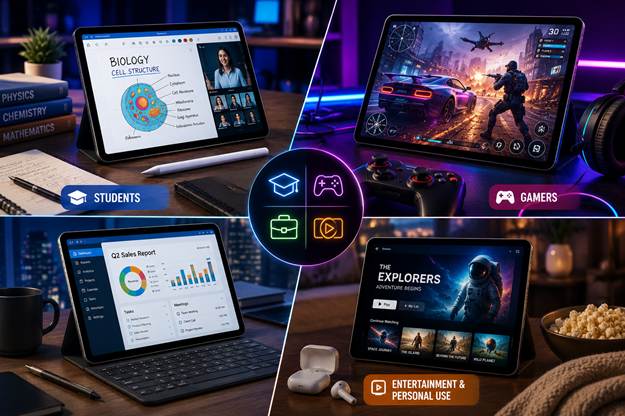
Different users have different priorities. Here’s a quick guide to help you choose the right type of tablet.
| User | Recommended Features |
| Students | 10–11-inch display, 6GB RAM, long battery life |
| Professionals | Powerful processor, keyboard support, multitasking |
| Gamers | Flagship processor, 120Hz display, 8GB+ RAM |
| Artists | Stylus support, color-accurate display |
| Readers | Lightweight design, eye-friendly display |
| Travelers | Compact size, long battery life, optional cellular connectivity |
Selecting a tablet based on your primary use case ensures better value and a more satisfying experience.
Tablet Accessories Worth Buying
The right accessories can significantly improve your tablet’s functionality and help you get more done.
1. Stylus Pen
Perfect for:
- Note-taking
- Digital art
- Signing documents
- Annotation
2. Keyboard Case
Transforms your tablet into a productivity device for:
- Typing documents
- Emails
- Presentations
- Office work
3. Protective Case
A durable case protects your tablet from scratches, accidental drops, and everyday wear.
4. Screen Protector
Helps maintain display quality while preventing scratches and fingerprints.
5. Bluetooth Mouse
Useful for multitasking and productivity, especially when paired with a keyboard.
6. USB-C Hub
Allows you to connect:
- USB drives
- External monitors
- SD cards
- Ethernet adapters
7. External SSD
Ideal for users working with large files such as videos, photos, or design projects.
Common Mistakes to Avoid
Many buyers regret their purchase because they overlook important factors before making a decision.
Avoid these common mistakes:
- Buying a tablet based only on price.
- Ignoring software update support.
- Choosing too little RAM or storage.
- Overlooking display quality.
- Forgetting to check stylus or keyboard compatibility.
- Ignoring battery life and charging speed.
- Purchasing a screen size that doesn’t suit your needs.
- Not checking warranty and after-sales service.
- Paying for premium features you’ll never use.
Taking a little extra time to compare specifications can help you choose a tablet that remains useful for years.
Final Buying Checklist
- Before you buy your next tablet, use this checklist:
- Choose the operating system that fits your ecosystem.
- Select a processor that matches your workload.
- Aim for at least 6GB RAM for smooth multitasking.
- Prefer 128GB storage if your budget allows.
- Pick the right display size and resolution.
- Check battery life and fast charging support.
- Decide between Wi-Fi-only and cellular connectivity.
- Confirm support for a stylus or keyboard if required.
- Compare warranty, software updates, and customer support.
- Read user reviews before making your final decision.
- This checklist can help you avoid common buying mistakes and choose a tablet that delivers long-term value.
Frequently Asked Questions (FAQs)
1. Which tablet is best for students in 2026?
Students should look for a tablet with a 10–11-inch display, 6GB RAM, 128GB storage, and good battery life. Stylus support is an added advantage for note-taking and studying.
2. Is 6GB RAM enough for a tablet?
Yes. For studying, office work, web browsing, streaming, and moderate multitasking, 6GB RAM is sufficient. Heavy gamers and creative professionals may benefit from 8GB or more.
3. Which operating system is better: Android or iPadOS?
Android offers more flexibility and a wider range of budget-friendly options. iPadOS provides excellent performance, optimized apps, and longer software support. Your choice depends on your budget and preferred ecosystem.
4. How much storage should I choose?
For most users, 128GB offers the best balance between price and storage. If you work with large media files or install many games, consider 256GB or higher.
5. Can a tablet replace a laptop?
For tasks such as browsing, document editing, online learning, streaming, and note-taking, a tablet with a keyboard can replace a laptop for many users. However, advanced software development, engineering applications, and professional video editing are still better suited to laptops.
Final Verdict
Choosing the best tablet in 2026 is about finding the right balance between performance, portability, features, and budget. Rather than focusing only on brand names or the highest specifications, think about how you’ll use the device every day. A student may prioritize battery life and note-taking features, while a gamer may need a faster processor and a high-refresh-rate display.
By carefully evaluating the operating system, processor, RAM, storage, display, battery life, connectivity, and accessory support, you can confidently select a tablet that fits your needs today and continues to perform well in the future.
Whether you’re buying your first tablet or upgrading from an older device, taking the time to compare features and understand your requirements will help you make a smarter investment. A well-chosen tablet can become your trusted companion for learning, productivity, creativity, entertainment, and staying connected wherever you go.
For More Details Clickhere