Have you ever been listening to music through earbuds and suddenly switched on How Earbuds Capture and Reproduce Outside Sound Transparency Mode, only to hear the person next to you almost as clearly as if your earbuds weren’t there? It can feel like the earbuds have somehow opened a tiny window to the outside world. They haven’t. Instead, microphones capture sounds around you, the earbuds process those signals, and their speakers reproduce the result in your ears.
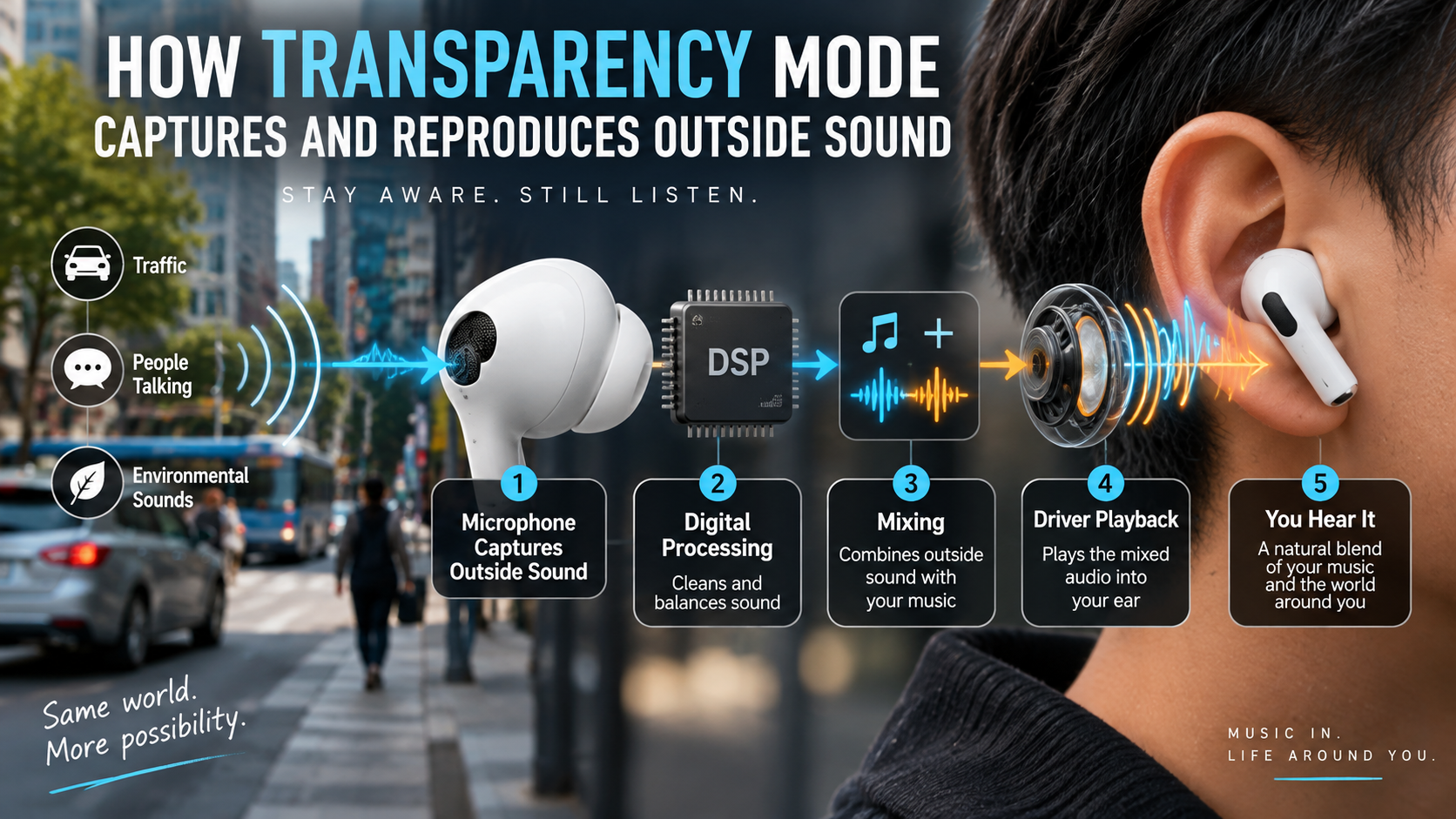
That simple trick involves several pieces of technology working together in real time. Once you understand the path from outside sound → microphone → processing → earbud driver → your ear, Transparency Mode becomes much less mysterious.
Quick Answer: What Does Transparency Mode Actually Do?
Transparency Mode uses microphones in earbuds or headphones to capture environmental sounds and feed processed versions of those sounds back through the earbud speakers while you continue listening to your own audio. This allows you to hear voices, announcements and other surrounding sounds without necessarily removing the earbuds.
It is therefore more than simply switching noise cancellation off. The earbuds are actively involved in bringing environmental audio into your listening experience.
A useful way to picture the process is:
Outside sound → microphones → audio processing → audio mixing → earbud driver → your ears
The exact hardware and processing methods vary between products, so not every pair of earbuds will produce identical results.
The Key Idea: Transparency Mode Recreates Your Surroundings
When you put in-ear earbuds into your ears, the earbuds themselves can physically reduce some outside sound. A good seal can make the effect even stronger.
That is useful when you want isolation. But it creates an obvious problem: what happens when someone speaks to you?
Removing the earbuds works, but doing that every few minutes gets annoying.
Transparency Mode approaches the problem electronically. Instead of relying only on the sound that can physically pass around or through the earbuds, the system uses microphones to capture environmental audio and sends a processed version through the earbuds. RTINGS describes the feature as mixing environmental sound with your audio so you can remain aware of what’s happening around you.
So if someone speaks beside you while you’re listening to music, the microphone can pick up their voice. The earbuds process that sound and reproduce it through the drivers.
You’re not literally hearing the original sound through an opened earbud.
You’re hearing a reproduced version of it.
That distinction explains a lot of what you notice about Transparency Mode.
Follow the Sound: What Happens Inside Transparency Mode?
The easiest way to understand the technology is to follow one sound from the outside world to your ear.
Imagine you’re sitting in a café wearing earbuds. Someone at the next table says your name.
What happens?
1. The external microphones capture the sound
The first step is microphone capture.
Earbuds with ambient or transparency features have microphones positioned around their housing. These microphones can pick up sounds in the surrounding environment, including speech, traffic, announcements and other ambient noise.
Many ANC-capable earbuds already have microphones that monitor the acoustic environment. When Transparency Mode is active, the system can use that microphone input to provide environmental sound to the listener rather than primarily using it to cancel unwanted noise.
The microphone does not need to “understand” that the sound is a human voice. Its basic job is to convert acoustic pressure changes into an electrical signal that the audio system can process.
2. The audio signal is processed
Capturing sound is only part of the job.
If the earbuds simply recorded everything around you and played it back without careful processing, the result could sound unnatural, delayed or uncomfortable.
This is where digital signal processing, commonly called DSP, becomes important.
The processing can help shape the captured signal so that it works with the earbud’s acoustic design and your existing audio.
The exact algorithms are manufacturer-specific, so it would be inaccurate to say that every Transparency Mode works in precisely the same way.
Some products also provide controls that let users adjust ambient sound levels or customize how outside audio is presented. Apple’s current documentation, for example, describes settings that can customize the level, tone and other characteristics of outside sound on supported AirPods.
3. Ambient sound can be combined with your music
Now imagine you’re listening to a podcast.
The earbuds have two things to manage:
- The podcast you’re already listening to
- The environmental sound captured by the microphones
The system can combine the processed ambient signal with your playback.
The result might effectively be:
Podcast + processed environmental sound
Both are then sent toward the earbud’s driver.
This is why Transparency Mode can feel so different from simply taking the earbuds out.
4. The earbud driver reproduces the signal
The earbud’s driver is the component that ultimately turns the electrical audio signal into physical sound waves.
Your ear then receives those reproduced sounds.
The person at the next table isn’t suddenly speaking directly into your earbud. Their voice was captured by the microphone, processed by the system and reproduced by the earbud driver.
That entire chain happens quickly enough that the experience can feel almost immediate.
5. Your brain receives a processed version of the environment
This is the part people often overlook.
With Transparency Mode enabled, the sound you hear isn’t necessarily identical to the sound you would hear if you removed your earbuds.
You’re hearing a combination of:
- Sound physically reaching your ears from the environment
- Sound captured by the microphones
- Sound modified by processing
- Sound reproduced by the earbud drivers
- Your own music, podcast or other playback
The balance between those elements depends on the earbud design and listening mode.
Why Doesn’t Transparency Mode Sound Exactly Like Taking Your Earbuds Out?
If Transparency Mode is so good at bringing the outside world back in, why doesn’t it always sound exactly like normal hearing?
Because the sound has taken a detour.
When you hear someone naturally, the sound travels through the surrounding air and reaches your ears directly. With Transparency Mode, at least part of what you hear may take this route:
Person → air → microphone → processing → earbud driver → ear
That introduces several opportunities for the sound to change.
Microphone placement matters
A microphone mounted on the outside of an earbud does not occupy exactly the same position as your ear canal.
That means it hears the environment from a slightly different acoustic position.
Processing changes the signal
The earbuds may alter the captured sound to make it work better with the device’s hardware or listening mode.
This can affect perceived volume, frequency balance and naturalness.
The earbud itself changes the acoustic environment
Even with Transparency Mode active, an in-ear earbud remains physically present in your ear.
The ear tip can affect how sound enters the ear canal, while the reproduced signal comes from a tiny driver positioned close to your ear.
Wind can be difficult
A microphone doesn’t know that you don’t care about the sound of air rushing over its housing.
If you’re walking quickly or cycling, wind can create significant microphone noise. Manufacturers can use processing to reduce unwanted effects, but different products handle this differently.
Latency can matter
There is also a timing issue.
The outside sound must be captured and processed before being reproduced through the earbud. If that delay becomes noticeable, the experience can feel unnatural.
Well-designed systems try to keep this delay low enough that the outside world and reproduced sound feel synchronized.
This is one reason two pairs of earbuds can have noticeably different Transparency Mode experiences even though both advertise essentially the same feature.
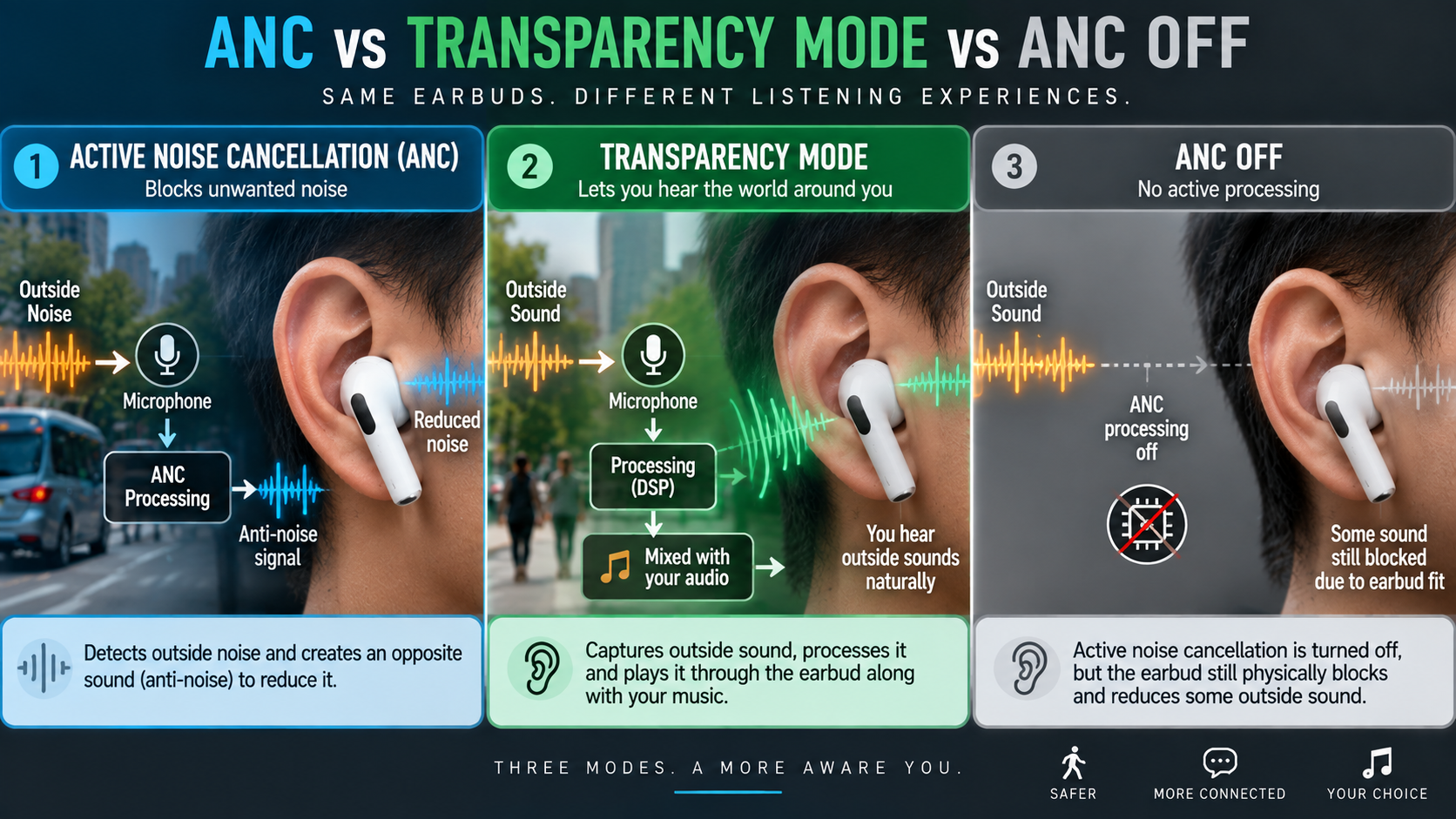
Transparency Mode vs ANC vs ANC Off: What’s the Difference?
These three modes are easy to confuse.
| Listening mode | What the system does | Typical purpose |
|---|---|---|
| ANC | Uses microphones and processing to reduce unwanted external sound | Isolation and quieter listening |
| Transparency Mode | Captures and reproduces environmental sound through the earbuds | Hearing your surroundings |
| ANC Off | Disables active noise-control processing; physical earbud isolation can still remain | Listening without active noise control |
With ANC, external microphones detect environmental sounds and the system generates anti-noise intended to reduce them. Apple also describes inward-facing microphones on supported AirPods that monitor unwanted sounds inside the ear.
Transparency Mode takes the listening experience in the opposite direction: it allows you to hear what’s happening around you.
But ANC Off is not necessarily the same thing as Transparency Mode.
If you turn ANC off, you’re not automatically telling the earbuds to capture the outside world and reproduce it through their speakers.
That distinction is especially important with sealed in-ear earbuds.
Where Transparency Mode Is Most Useful
Transparency Mode isn’t something most people turn on because they want to admire the technology. They use it because taking an earbud out is inconvenient.
At a railway station or airport
You’re listening to music when an announcement starts.
Instead of removing your earbuds, Transparency Mode can let environmental audio reach you through the earbuds while your personal audio continues playing.
That doesn’t guarantee you’ll catch every announcement, especially in a very loud environment, but it can make staying aware of your surroundings more convenient.
In the office
Someone walks over and starts talking.
With Transparency Mode active, you may be able to hear the person without reaching for your earbuds.
Some products go further with conversation-focused features that adjust playback or emphasize speech. RTINGS documents examples including JBL’s Talk Thru and other automatic ambient modes.
At home
You might want to listen to a podcast while still hearing the doorbell, a family member calling you, or something happening elsewhere in the room.
During a commute
Environmental awareness can be useful around roads, platforms and busy pedestrian areas.
However, Transparency Mode should not be treated as a guarantee of safety. Music volume, environmental conditions and the performance of the specific earbuds all affect what you can actually hear.
Would you really want complete silence while walking through a busy environment? For many listeners, that’s precisely where an ambient mode becomes useful.
During short conversations
Sometimes the conversation lasts only 20 seconds.
Taking both earbuds out, putting them somewhere safe, having the conversation, putting them back in and restarting your audio can feel absurdly complicated.
Transparency Mode removes some of that friction.
What Happens to Transparency Mode in a Noisy Environment?
Transparency Mode has limits.
A quiet office is relatively simple: there may be a few voices, air-conditioning and keyboard sounds.
A crowded street is a completely different problem.
The microphones may capture:
- Traffic
- Horns
- Footsteps
- Conversations
- Wind
- Construction
- Music
- Sirens
- Vehicle engines
The system has to process all of that while you’re also listening to your own audio.
Wind is particularly troublesome
Wind hitting an external microphone can create a strong low-frequency or rushing sound.
This is why some companion apps include wind-reduction controls or specialized processing.
Many voices create a harder problem
If five people are talking at once, the earbuds cannot magically know which person you want to hear unless the product includes additional processing designed for that purpose.
Some systems can prioritize certain sounds or voices, but capabilities vary by model.
Sudden loud sounds can trigger specialized processing
Some newer listening systems can dynamically modify noise control in response to changing surroundings.
For example, Apple describes Adaptive Audio as combining elements of Transparency and Active Noise Cancellation and adjusting noise control according to environmental conditions on supported AirPods.
That is different from basic Transparency Mode and should not be assumed to exist on every pair of earbuds.
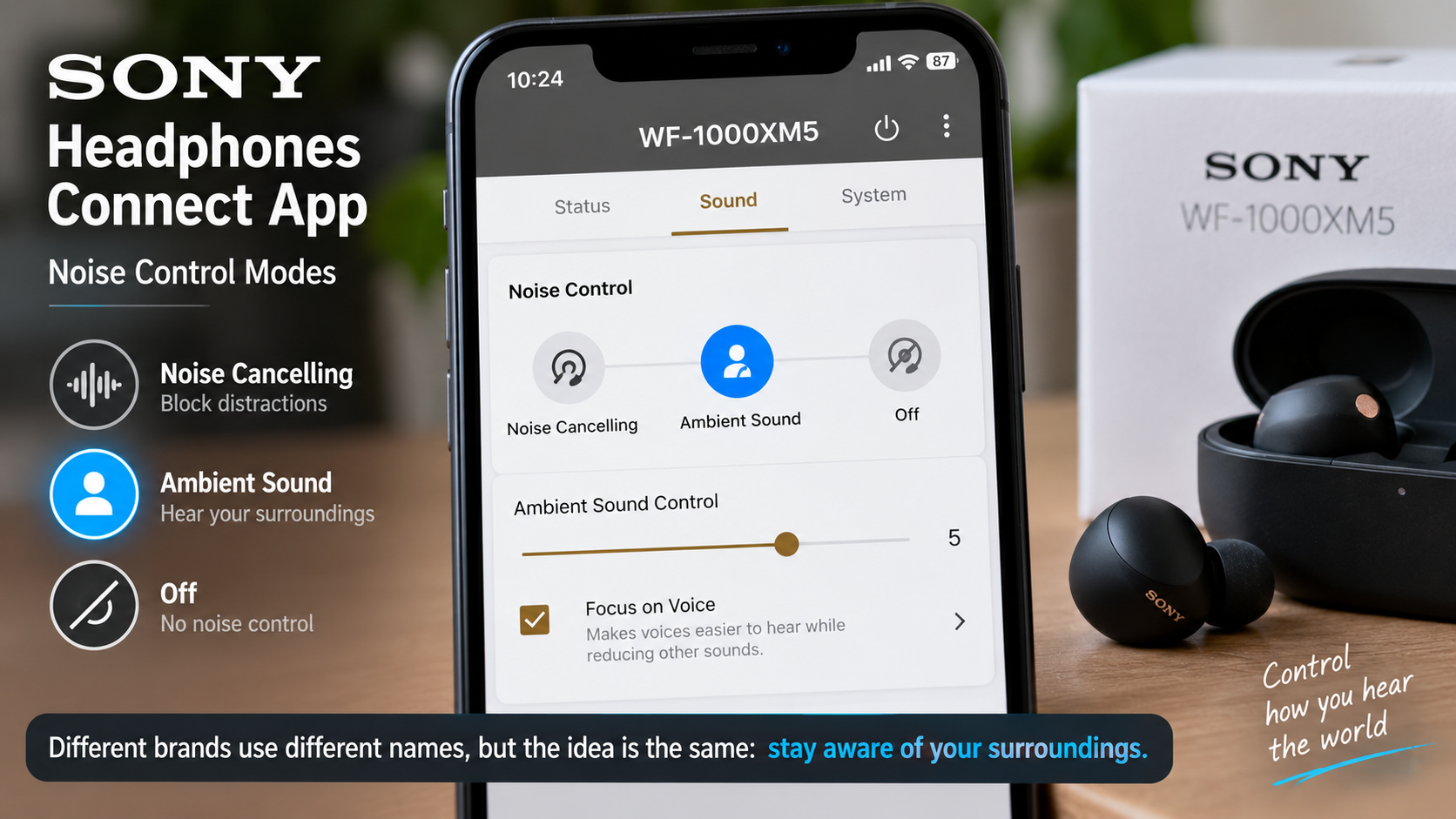
Why Different Brands Use Different Names
If you’re shopping for earbuds, you may never see the exact words Transparency Mode.
That’s because manufacturers have created their own names for broadly similar concepts.
| Brand | Example terminology |
|---|---|
| Apple | Transparency |
| Sony | Ambient Sound |
| Samsung | Ambient Sound |
| Bose | Aware |
| Sennheiser | Transparency |
| Soundcore | Transparency Mode |
| JBL | Ambient Aware / TalkThru |
These names don’t mean that every implementation is technically identical. They mainly reflect different product ecosystems and feature designs. RTINGS documents these naming differences across major headphone brands.
So when comparing earbuds, don’t search only for “Transparency Mode.”
Also look for phrases such as:
Ambient Sound, Ambient Aware, Aware Mode, Hear-Through, Ambient Mode, or TalkThru.
That can prevent you from overlooking a feature simply because the manufacturer uses a different label.
Does Transparency Mode Use the Same Microphones as ANC?
Often, the microphone hardware used for active noise control also contributes to ambient or transparency functionality, but the exact implementation depends on the product.
That distinction matters.
It is tempting to say, “ANC uses these microphones and Transparency uses those microphones,” as if every pair of earbuds follows one universal architecture. It doesn’t.
For example, Apple documents outward-facing microphones for detecting external sound during ANC and describes Transparency Mode as allowing outside sound to be heard. Independent technical explainers also describe transparency systems as repurposing microphones used for noise cancellation to capture ambient sound.
The actual microphone arrangement, processing pipeline and algorithms can differ considerably between products.
That’s one reason manufacturer specifications and technical documentation are useful when discussing a particular model.
What Are the Real Benefits and the Trade-Offs?
Transparency Mode is useful, but it isn’t magic.
Pros
- Environmental awareness: You can hear surrounding sounds without necessarily removing your earbuds.
- Convenient conversations: Short conversations become less disruptive to your listening session.
- Useful for announcements: Airport, railway and workplace announcements can remain audible.
- Flexible listening: You can switch between isolation and environmental awareness depending on the situation.
- Potential customization: Some earbuds let you adjust ambient sound levels or related settings.
Cons
- It isn’t identical to natural hearing: The environmental sound can be captured and reproduced rather than reaching your ears entirely naturally.
- Quality varies: Microphone quality, processing and earbud design all influence the result.
- Wind can be distracting: Outdoor movement can create microphone noise.
- Latency can affect realism: Processing takes time, even if the delay is small.
- It uses active electronics: Transparency Mode requires the earbuds’ electronics to operate.
- It isn’t automatically hearing protection: An ambient listening mode should not be treated as equivalent to certified hearing-protection equipment.
The last point is particularly important. A feature designed to make environmental sound audible has a very different purpose from equipment designed specifically to protect hearing.
How to Judge Transparency Mode When Buying Earbuds
If you’re considering a new pair of earbuds, don’t judge Transparency Mode solely by whether the product page says “Transparency.”
Look for evidence about how the feature actually behaves.
Voice naturalness
Can you hear someone speaking without their voice sounding heavily processed?
Ambient volume controls
Can you adjust how much environmental sound is reproduced?
Apple, for example, provides several Transparency-related customization options on supported devices, including controls for amplification, tone and ambient-noise reduction.
Wind handling
If you spend a lot of time outdoors, independent testing of microphone and wind performance can be more useful than marketing language.
Switching controls
Can you quickly move from ANC to Transparency without opening your phone?
A physical button, touch control or stem gesture can make a surprising difference in daily use.
Adaptive features
Some premium earbuds provide automatic adjustment based on environmental conditions. If this matters to you, verify that the exact model supports it rather than assuming all earbuds with Transparency Mode do.
One-earbud behavior
If you regularly use one earbud at a time, check the manufacturer’s documentation for how listening modes behave in that configuration.
Independent testing
Manufacturer descriptions explain what a feature is designed to do. Independent testing can help answer a different question:
How well does it actually work?
Common Transparency Mode Misconceptions
Transparency Mode opens a hole in the earbuds.
No. The earbuds remain physically present in your ears. The feature uses microphones, processing and the earbud’s audio system to reproduce environmental sound.
ANC Off and Transparency Mode are identical.
Not necessarily.
ANC Off disables active noise-control processing, while Transparency Mode actively brings environmental sound into the listening experience.
Every pair of Transparency earbuds sounds the same.
Definitely not.
Microphone placement, processing, acoustic design, fit and software all influence the final result.
Transparency Mode means I hear everything around me normally.
Not necessarily.
Some environmental sound may be physically reaching your ears, while some is being captured and reproduced electronically. Loud music can also mask environmental sounds.
Transparency Mode is hearing protection.
No. The purpose is environmental awareness, not automatically protecting your ears from hazardous sound levels.
More ambient sound is always better.
Not necessarily.
The most useful setting depends on what you’re doing. A level that works for a quiet office may be distracting on a busy street.
Frequently Asked Questions About Transparency Mode
What exactly does Transparency Mode do on earbuds?
Transparency Mode uses microphones to capture sounds around you and reproduces processed versions of those sounds through the earbuds, allowing you to hear your environment while continuing to listen to your own audio.
How do earbuds hear outside sound while playing music?
External microphones capture environmental sounds. The earbuds then process those signals and can mix the resulting ambient audio with your music, podcast or other playback before sending the combined signal to the drivers.
Is Transparency Mode the same as turning ANC off?
No. Turning ANC off generally disables active noise cancellation, but the earbuds’ physical presence can still reduce outside sound. Transparency Mode actively captures and reproduces environmental audio.
Does Transparency Mode use microphones?
Yes. Microphones are central to the feature because they capture surrounding sound that can then be processed and reproduced through the earbuds. The exact microphone configuration varies between products.
Why does Transparency Mode sometimes sound unnatural?
The outside sound has been captured by microphones, processed and reproduced through tiny drivers rather than reaching your ears entirely through the natural acoustic path. Microphone placement, processing, frequency response, fit, wind and latency can all affect how natural it sounds.
Is Transparency Mode a form of hearing protection?
Not by itself. Transparency Mode is primarily designed to let users hear their surroundings. It should not automatically be considered a substitute for dedicated hearing-protection equipment.
The Simple Way to Remember Transparency Mode
The technology sounds complicated until you reduce it to one basic idea:
Transparency Mode gives your earbuds a way to listen to the outside world on your behalf.
The microphones capture what’s happening around you. Digital processing shapes that captured audio. The system mixes it with your existing playback when appropriate, and the earbud drivers reproduce the resulting signal.
That’s why you can hear a colleague speaking, a station announcement or the general sound of a room without immediately taking your earbuds out.
It also explains why Transparency Mode can sound different from simply removing the earbuds. You’re not just opening your ears—you’re experiencing an electronically processed version of the environment.
And once you understand that, the difference between ANC, Transparency Mode and ANC Off becomes much easier to understand: ANC tries to reduce the outside world, Transparency Mode deliberately brings it into your listening experience, and turning active modes off simply removes that active processing.
How Earbuds Capture and Reproduce Outside, Conclusion
Transparency Mode is essentially a real-time audio capture and reproduction system built into modern earbuds and headphones. Instead of forcing you to choose between hearing your music and hearing the world, it uses microphones and audio processing to combine the two experiences.
The important thing is not to think of it as a simple “sound passthrough” switch. The microphones, processing algorithms, earbud fit and speaker drivers all influence what eventually reaches your ears.
So the next time you switch from ANC to Transparency Mode and suddenly hear someone talking beside you, you know what is happening: the earbuds are listening to the outside world, processing what they hear and playing that information back to you.