

You’ve probably already realized that a laptop is essential for assignments, research, presentations, coding, online classes, and everyday college work. However, choosing the right model is harder than it looks because the cheapest laptop may feel slow later, while a powerful premium laptop can cost far more than your course actually requires. In this guide, we’ll compare the best laptops for students in 2026, explain which specifications matter, and show you how to choose the right laptop for your course, budget, and workload.
Key Takeaways
- Student laptops should balance performance, battery life, portability, durability, and price rather than maximizing specifications in every category.
- 8GB RAM can handle basic student tasks, while 16GB RAM is a better target for multitasking, coding, creative applications, and longer-term use.
- SSD storage provides faster startup and application loading than traditional hard drives and should be preferred for modern student laptops.
- Laptop requirements vary by course, with engineering, programming, design, video editing, and gaming generally requiring more performance than web browsing and document work.
- Battery life and weight matter for students who carry their laptops between classes, libraries, and study locations.
- Operating-system compatibility should be checked before buying because some academic, engineering, or creative software may work better on a particular platform.
- The best student laptop is the model that meets your actual workload and budget while providing enough performance and battery life for several years.
What Is the Best Laptop for Students in 2026?
A student laptop is a portable computer designed to balance academic performance, battery life, portability, durability, and affordability.
First, the best laptop for you depends on what you actually do with it. A business student writing reports and attending video classes has very different requirements from an engineering student running CAD software or a computer science student compiling code.
For example, a lightweight laptop with 16GB RAM and a 512GB SSD can be an excellent choice for writing assignments, browsing research papers, attending classes, programming, and multitasking.
Moreover, current 2026 options range from affordable models such as the MacBook Neo to premium machines such as the MacBook Air M5 and high-end Windows laptops. Apple’s MacBook Neo starts at ₹69,900 in India, while the MacBook Air M5 starts at ₹1,19,900.
What Makes a Laptop Good for College Students?
A good college laptop provides enough performance for your coursework without sacrificing portability, battery life, or reliability.
First, look for a modern processor, at least 8GB of RAM, SSD storage, a comfortable keyboard, a good webcam, and enough battery life for your daily schedule. For most students, 16GB RAM and 512GB SSD are the more comfortable long-term targets.
For example, a student who keeps Chrome tabs, Microsoft Word, PowerPoint, Spotify, Teams, and PDF research open simultaneously will benefit from 16GB RAM more than a student who only writes occasional documents.
At the same time, Windows 11 itself has a minimum requirement of only 4GB RAM and 64GB storage, but those figures describe operating-system compatibility rather than a comfortable specification for a modern student laptop.
How We Evaluate Student Laptops
A student laptop should be evaluated by real-world academic use rather than specifications alone.
First, consider these factors:
| Factor | What to Look For | Why It Matters |
|---|---|---|
| Processor | Modern Intel, AMD, Apple, or Snapdragon chip | Determines everyday responsiveness |
| RAM | 8GB minimum; 16GB preferred | Helps with multitasking |
| Storage | 512GB SSD preferred | Faster apps and enough space |
| Display | 13–15 inches, good brightness | Better for reading and studying |
| Battery | All-day target | Reduces dependence on chargers |
| Weight | Around 1.2–1.7 kg for portability | Easier to carry around campus |
| GPU | Integrated for basic work; dedicated for demanding work | Important for gaming, CAD, and editing |
| Keyboard | Comfortable and preferably backlit | Useful for long assignments |
| Webcam | 1080p preferred | Better online classes and meetings |
| OS | Windows, macOS, or ChromeOS | Determines software compatibility |
Moreover, this approach prevents a common mistake: buying a laptop because it has a fast processor while ignoring its poor battery life, uncomfortable keyboard, or inadequate storage.
Why Are the Best Student Laptops Important in 2026?
The right student laptop matters because it can affect productivity, study time, software compatibility, portability, and the total cost of your education.
First, students increasingly use laptops for more than typing assignments. A typical academic workload can include browser research, PDFs, spreadsheets, presentations, video calls, coding environments, cloud applications, and AI tools running at the same time.
For example, a laptop with 8GB RAM may work for basic Word documents but become restrictive when you run multiple browser tabs, an IDE, a video meeting, and several other applications together.
Second, choosing correctly can also prevent unnecessary spending. You do not need a gaming laptop with a powerful dedicated GPU if your degree mainly involves documents, presentations, research, and web applications.
At the same time, buying too little performance can be expensive in the long run because replacing a laptop after one or two years can cost more than buying an appropriate configuration initially.
Why Battery Life Matters for Students
Battery life matters because students often work away from a power outlet for several hours at a time.
First, students may move between classrooms, libraries, cafeterias, laboratories, and homes during a normal day. A laptop that requires frequent charging becomes inconvenient even when its processor is powerful.
For example, Apple’s 2026 MacBook Air M5 is rated for up to 18 hours of battery life, while Apple’s MacBook Neo is rated for up to 16 hours. Real-world battery life varies according to workload and settings.
Moreover, battery capacity is not the only factor. Processor efficiency, display brightness, background applications, operating system, and workload can all change actual runtime.
Why Portability Matters for College
Portability matters because a student may carry a laptop for several hours every day.
First, a 1.3kg laptop can feel substantially easier to carry than a 2.5kg gaming machine when you travel across campus repeatedly.
For example, the ASUS Zenbook 14 is listed at approximately 1.28kg and 14.9mm thick, making portability one of its major strengths.
That being said, heavier laptops can still make sense when your course requires a dedicated GPU, larger cooling system, or workstation-class performance.
What Are the Best Laptops for Students in 2026?
The best laptops for students in 2026 include the Apple MacBook Air M5, Apple MacBook Neo, Microsoft Surface Laptop 8, ASUS Zenbook 14, Lenovo IdeaPad Slim 5i, Dell XPS 13, HP OmniBook 7 Aero, and selected Chromebook Plus models.
First, no single laptop is ideal for every student. The following shortlist is organized around different needs rather than treating every student as the same buyer.
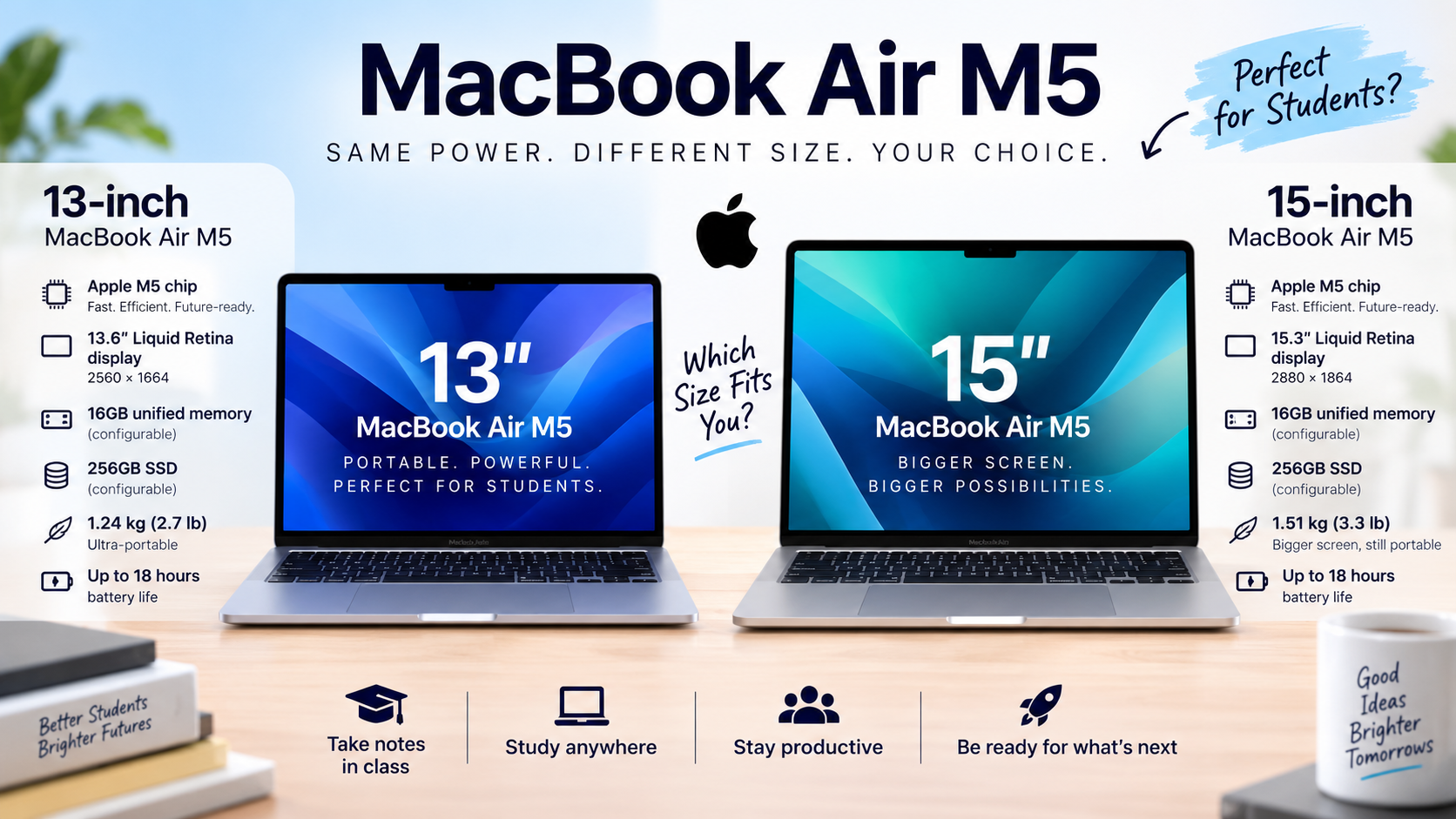
1. Apple MacBook Air M5 – Best Overall for Many Students
The MacBook Air M5 is one of the strongest all-around student laptops in 2026 because it combines performance, portability, battery life, display quality, and long-term usability.
First, the 13-inch and 15-inch models use Apple’s M5 chip and start with 16GB unified memory and 512GB storage. Apple rates the Air for up to 18 hours of battery life.
For example, the 13-inch model is particularly attractive for students who move between classrooms because it provides a compact form factor without giving up substantial performance.
Moreover, Apple lists the 13-inch MacBook Air at ₹119,900 in India, with education pricing available for eligible students and educators.
Best for: College students, business students, writers, programmers, creators, and students who prioritize portability.
Watch out for: Some specialized Windows-only academic applications may require a different platform.
2. Apple MacBook Neo – Best Affordable Mac
The MacBook Neo is Apple’s entry-level laptop for students who want macOS at a substantially lower starting price.
First, Apple launched the MacBook Neo in 2026 with a starting price of ₹69,900 in India, or ₹59,900 for education. It uses Apple’s A18 Pro chip, has a 13-inch Liquid Retina display, and is rated for up to 16 hours of battery life.
For example, a student who mainly uses a browser, Microsoft 365, documents, presentations, video calls, and everyday apps can get the core Mac experience without moving into MacBook Air pricing.
At the same time, buyers should check the exact memory and storage configuration before purchasing because lower-cost configurations can involve compromises that matter more over several years.
Best for: Students who want a lower-cost Mac for everyday academic work.
Watch out for: Students with demanding professional applications should verify software compatibility and hardware requirements first.
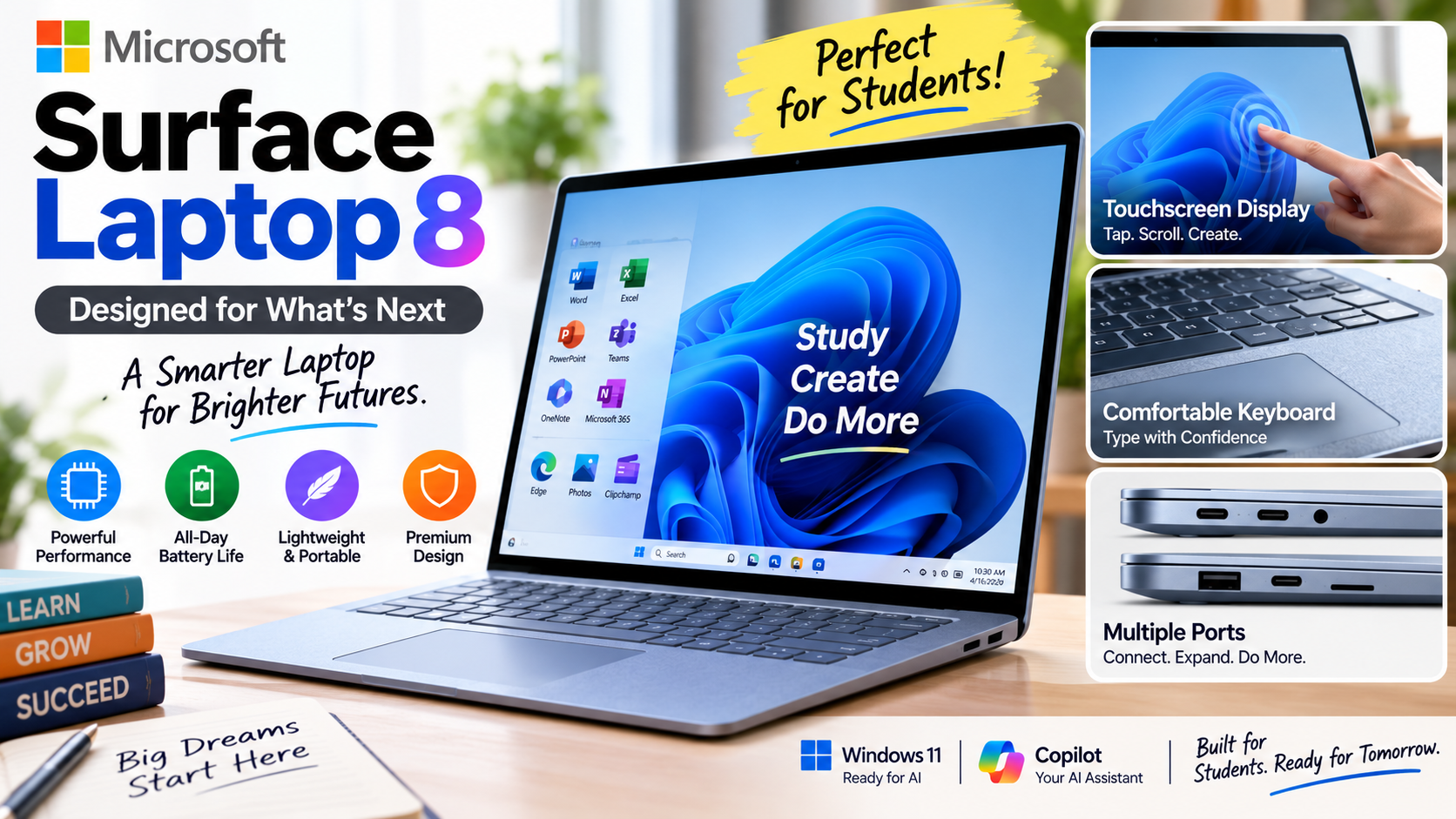
3. Microsoft Surface Laptop 8 – Best Premium Windows Option
The Microsoft Surface Laptop 8 is a strong premium Windows choice for students who want portability, a touchscreen, and a polished Windows experience.
First, Microsoft’s current Surface Laptop range is available in 13-, 13.8-, and 15-inch sizes, with an aluminum body and a full-size keyboard.
Moreover, Microsoft’s published testing for the 8th Edition includes Snapdragon X2 Plus and X2 Elite configurations with 16GB RAM and 512GB storage, although battery results vary with settings and usage.
For example, this makes the Surface particularly appealing if you want a traditional Windows laptop that is easy to carry between classes.
Best for: Business, education, writing, productivity, and general college use.
Watch out for: Snapdragon/ARM software compatibility should be checked if your course depends on specialized Windows applications.
4. ASUS Zenbook 14 – Best Lightweight Windows Laptop
The ASUS Zenbook 14 is a strong choice for students who prioritize portability, display quality, battery life, and connectivity.
First, current Zenbook 14 configurations include modern AMD Ryzen AI or Intel Core Ultra processors, 16GB or more memory depending on configuration, and OLED display options. ASUS lists a 1.28kg chassis, a 75Wh battery on the current AMD model, and multiple ports.
For example, the 3K OLED configuration provides a 2880 × 1800 resolution and 120Hz refresh rate, which can make long reading sessions, design work, and media consumption more enjoyable.
Best for: Students who want a lightweight Windows laptop with a premium screen.
Watch out for: OLED panels can use more power in some workloads, and exact specifications vary by configuration.
5. Lenovo IdeaPad Slim 5i – Best Value Windows Choice
The Lenovo IdeaPad Slim 5i is a practical student laptop family for buyers who want mainstream Windows performance without paying premium ultrabook prices.
First, Lenovo’s current IdeaPad Slim 5i lineup includes newer Intel-based models and OLED display options, while earlier configurations have offered Core Ultra processors, 16GB memory, and SSD storage.
For example, an IdeaPad configuration with 16GB RAM and a 1TB SSD can provide plenty of capacity for documents, applications, photos, projects, and local files.
Moreover, Lenovo has also offered student-oriented promotions and configurations, so the exact value can change significantly depending on the sale price and configuration available in your region.
Best for: College students, business students, general productivity, and buyers focused on value.
Watch out for: Compare the exact display, processor, RAM, and storage configuration rather than buying based only on the IdeaPad name.
6. Dell XPS 13 – Best Compact Premium Windows Laptop
The Dell XPS 13 is designed for students who want a compact, premium Windows laptop with a high-resolution display and strong portability.
First, Dell’s 2026 XPS 13 includes a 13.4-inch 2.5K display option with a 30–120Hz variable refresh rate and 500-nit brightness. Dell lists configurations with 8GB or 16GB LPDDR5X memory.
For example, the XPS 13 can make sense for a student who spends significant time reading documents, writing, browsing, and carrying a laptop around campus.
At the same time, the base 8GB configuration deserves careful consideration because 16GB is a better target for students planning to keep a laptop for several years.
Best for: Students who want premium Windows portability.
Watch out for: Avoid paying a premium for a configuration that does not provide enough RAM or storage for your workload.
7. HP OmniBook 7 Aero – Best Lightweight Productivity Option
The HP OmniBook 7 Aero is a lightweight Windows laptop aimed at users who want portable productivity with modern processor options.
First, HP lists the 2026 OmniBook 7 Aero 14-inch series with processors including the Intel Core Ultra 5 225H and Core Ultra 7 255H, although specifications vary by market and configuration.
For example, students who frequently work from libraries, cafés, classrooms, or shared study spaces can benefit from a lightweight productivity-focused machine.
Best for: Students prioritizing mobility and everyday productivity.
Watch out for: Check the exact regional configuration before comparing it with another laptop.
8. Chromebook Plus – Best for Web-Based Student Work
A Chromebook Plus is best suited to students whose academic workflow primarily uses web applications, cloud storage, Google Workspace, and browser-based services.
First, Chromebooks can be attractive because they are generally simple to use and well suited to browser-first workflows.
For example, a student who spends most of the day in Google Docs, Drive, Classroom, Gmail, browser research, and web-based learning platforms may not need a traditional high-performance Windows laptop.
However, Chromebooks are less suitable when your university requires specialized Windows or macOS software.
Best for: School students, web-based learning, Google Workspace, and lightweight academic workloads.
Watch out for: Always verify the software requirements of your course.
How Much RAM Does a Student Laptop Need in 2026?
Most students should target 16GB RAM in 2026, while 8GB can still work for basic academic tasks.
First, RAM affects how many applications and browser tabs your computer can comfortably keep active. It does not directly determine how much storage you have.
For example, writing an essay in Word while researching in Chrome is a relatively light workload, while running an IDE, multiple browser windows, Docker containers, a video meeting, and design software requires considerably more memory.
Moreover, Microsoft’s minimum Windows 11 requirement is only 4GB RAM, but a minimum operating-system requirement should not be treated as a recommended student specification.
Is 8GB RAM Enough for Students?
8GB RAM is enough for basic student workloads but provides less headroom for multitasking and demanding applications.
First, 8GB can handle activities such as web browsing, document editing, email, presentations, streaming, and basic online learning.
For example, a student studying literature who mainly uses Google Docs, PDFs, research websites, and video calls can reasonably operate within an 8GB configuration.
That being said, 16GB is the safer choice when the price difference is reasonable because students often keep laptops for several years and their software requirements can grow.
Is 16GB or 32GB RAM Better?
16GB RAM is the practical sweet spot for most students, while 32GB is valuable for demanding technical and creative workloads.
First, 16GB gives you more room for multitasking without forcing you to close applications constantly.
For example, computer science students running development environments, virtual machines, containers, databases, and browser tools may benefit from 32GB.
Similarly, Adobe’s current Premiere guidance recommends 32GB RAM or more for Windows or Intel-based systems for reliable performance in demanding workflows.
How Much Storage Should a Student Laptop Have?
A 512GB SSD is the recommended storage target for most students in 2026.
First, SSD storage makes the computer feel responsive because applications, files, and the operating system can load quickly. It also provides enough space for documents, applications, photos, coursework, and offline media.
For example, a student with a 256GB laptop may eventually have to manage storage carefully after installing development tools, creative software, games, and large project files.
Moreover, Apple’s 2026 MacBook Air M5 starts with 512GB storage and can be configured up to 4TB, showing how higher-capacity storage is increasingly positioned as a practical starting point in premium laptops.
Is 256GB Enough for College?
256GB can be enough for basic college work, but 512GB provides significantly more flexibility.
First, 256GB works if most files remain in cloud storage and you use relatively few large applications.
For example, a student who mainly uses browser applications and cloud-based documents can function comfortably with 256GB.
However, students working with video, photography, engineering projects, programming environments, or large datasets should consider 512GB or 1TB.
Which Processor Is Best for Student Laptops?
The best processor for a student laptop is a modern chip that matches the student’s workload rather than simply having the highest benchmark score.
First, modern student laptops can use Apple silicon, Intel Core, AMD Ryzen, or Snapdragon processors. The important factor is how the processor performs with the applications you actually need.
For example, a business student does not need the same CPU performance as a student running simulations, compiling large software projects, or rendering video.
Moreover, newer chips increasingly include dedicated AI processing capabilities. Microsoft’s Copilot+ PC requirements, for example, specify an NPU capable of 40+ TOPS, along with 16GB RAM and 256GB SSD/UFS storage.
Intel vs AMD vs Apple Silicon vs Snapdragon
Intel and AMD provide broad Windows compatibility, Apple silicon provides strong macOS efficiency, and Snapdragon offers another ARM-based Windows option with potential battery-life advantages.
First, Intel and AMD remain attractive when your course requires traditional Windows applications or specialized software.
For example, AutoCAD 2026 lists Windows and macOS support but provides different hardware requirements for each platform, demonstrating why software compatibility should be checked before buying.
Second, Apple silicon is attractive for students who want macOS and strong performance per watt. The MacBook Air M5 uses a 10-core CPU and can be configured with up to 32GB unified memory.
At the same time, Snapdragon-based Windows laptops can provide excellent efficiency, but students should verify that required applications and peripherals work correctly on ARM Windows.
What Is the Best Laptop for Coding and Computer Science Students?
The best laptop for coding students should prioritize 16GB or more RAM, a fast SSD, a capable processor, a comfortable keyboard, and strong battery life.
First, programming workloads vary dramatically. Web development may run comfortably on a mainstream laptop, while Android development, virtualization, machine learning, and containerized environments can demand significantly more memory and processing power.
For example, a computer science student working with VS Code, a browser, Git, Docker, a local database, and an emulator will benefit from 16GB or 32GB RAM.
Moreover, keyboard quality matters more for programmers because long coding sessions can involve thousands of keystrokes.
Recommended target: 16GB RAM, 512GB SSD, modern Core Ultra/Ryzen/Apple silicon-class processor, and a high-quality keyboard.
What Is the Best Laptop for Engineering Students?
Engineering students should choose a laptop according to the specific engineering software used by their university, with CAD and simulation students often needing substantially more hardware than general students.
First, engineering requirements differ between mechanical, civil, electrical, computer, and other disciplines.
For example, Autodesk AutoCAD 2026 lists 8GB RAM as basic and 32GB as recommended for Windows, while its recommended Windows graphics specification includes an 8GB GPU.
Moreover, engineering students working with 3D models, simulations, large assemblies, or specialized applications may need a dedicated NVIDIA or AMD GPU rather than integrated graphics.
Recommended target: 16–32GB RAM, 512GB–1TB SSD, a strong multi-core processor, and dedicated graphics when required by your course software.
What Is the Best Laptop for Graphic Design and Video Editing Students?
Creative students should prioritize display quality, color accuracy, RAM, GPU performance, and fast storage rather than focusing only on CPU speed.
First, graphic design students should look for a high-quality display with strong color reproduction, while video editors need enough memory and graphics performance for their editing software.
For example, Adobe’s current Premiere guidance recommends 32GB RAM or more for demanding Windows or Intel-based workflows, while its GPU recommendations emphasize dedicated graphics memory for accelerated playback, rendering, and export.
At the same time, a student editing occasional 1080p projects does not necessarily need a workstation-class laptop.
Recommended target: 16GB minimum, 32GB preferred for serious editing, 512GB–1TB SSD, high-quality display, and dedicated GPU for demanding video workflows.
Are MacBooks Good for College Students in 2026?
MacBooks are excellent college laptops for students whose required software works well on macOS.
First, Apple’s 2026 MacBook Air M5 combines 16GB starting memory, 512GB starting storage, an efficient M5 chip, a high-resolution display, and up to 18 hours of claimed battery life.
For example, students studying writing, business, communications, computer science, marketing, and many creative disciplines can find the MacBook Air particularly well suited to daily academic work.
However, students should not choose macOS based only on battery life or brand preference. Engineering, accounting, specialized research, and other programs can depend on applications that work best on Windows.
Are Windows Laptops Better Than MacBooks for Students?
Windows laptops and MacBooks serve different student needs, so the better choice depends on software compatibility, budget, hardware preferences, and course requirements.
First, Windows offers a broader range of hardware prices, configurations, ports, touchscreen options, gaming systems, and specialized machines.
For example, an engineering student who needs Windows-only CAD or simulation software may benefit more from a Windows workstation than a MacBook.
At the same time, a student who values battery life, portability, silent operation, and the macOS ecosystem may prefer a MacBook Air.
Neither platform is universally better; the correct choice is the one that supports your academic workflow.
Are Chromebooks Good Enough for College Students?
Chromebooks are good college laptops when your academic workflow is primarily browser-based and cloud-focused.
First, Chromebooks work particularly well for Google Workspace, web research, online learning platforms, email, document editing, and cloud storage.
For example, a student whose university uses Google Classroom, Docs, Sheets, Drive, and browser-based applications can complete much of their work without Windows or macOS.
However, specialized desktop applications can change the decision. Students studying engineering, advanced video production, certain programming disciplines, or other technical fields should check software compatibility before buying.
How Much Should You Spend on a Student Laptop in 2026?
A sensible student laptop budget depends on your course, but spending more on RAM, storage, battery life, and build quality can be more valuable than buying the fastest processor available.
First, budget-conscious students can consider entry-level Windows laptops or the MacBook Neo, while students wanting a premium everyday laptop can move toward the MacBook Air, Surface Laptop, Zenbook, or XPS range.
For example, Apple’s MacBook Neo starts at ₹69,900 in India, while the 13-inch MacBook Air M5 starts at ₹119,900. ASUS currently lists a Zenbook 14 configuration from ₹92,990 in India, although prices and configurations can change.
A practical budget framework is:
- Under ₹50,000: Basic schoolwork, browsing, documents, and online classes.
- ₹50,000–₹80,000: Better mainstream student laptops and selected entry-level premium models.
- ₹80,000–₹1,20,000: Strong productivity laptops with better displays and performance.
- ₹1,20,000+: Premium ultrabooks, creative machines, and specialized high-performance laptops.
What Laptop Features Should Students Avoid Paying Extra For?
Students should avoid paying for premium specifications that do not improve their actual coursework or daily workflow.
First, a powerful dedicated GPU is unnecessary for many students who mainly use documents, browsers, presentations, and video calls.
For example, buying a gaming laptop with a high-end GPU for a business degree can add weight, cost, and power consumption without providing a meaningful academic benefit.
Second, excessive storage can also be wasteful if most files live in cloud storage. A 4TB SSD is useful for certain creative workflows, but most students can start comfortably with 512GB.
Moreover, a high-refresh-rate display can be enjoyable, but it should not take priority over RAM, battery life, keyboard quality, or software compatibility when the budget is limited.
What Should You Check Before Buying a Laptop for College?
Students should verify their course software, recommended specifications, RAM, storage, battery expectations, weight, display, warranty, and upgrade options before purchasing a laptop.
First, check your university’s software list. This single step can eliminate unsuitable laptops before you spend any money.
For example, Autodesk’s AutoCAD 2026 requirements differ between basic and recommended configurations, while Adobe Premiere has significantly higher memory and GPU recommendations for demanding workflows.
Second, check the exact model number rather than relying on the laptop family name. A laptop series can contain configurations with different processors, displays, RAM, storage, and batteries.
Student Laptop Buying Checklist
Before buying, verify:
- Course requirements – Check required academic applications.
- RAM – Prefer 16GB for long-term use.
- Storage – Choose 512GB SSD when possible.
- Processor – Match it to your workload.
- GPU – Buy dedicated graphics only when necessary.
- Display – Check resolution, brightness, size, and color quality.
- Battery – Look for strong manufacturer-rated endurance.
- Weight – Consider how far you carry it every day.
- Keyboard – Test it if possible.
- Ports – Check USB-C, USB-A, HDMI, audio, and charging requirements.
- Warranty – Compare coverage before buying.
- Price – Compare the exact configuration, not just the model name.
Which Student Laptop Should You Buy in 2026?
The best student laptop in 2026 is the one that fits your course, software requirements, budget, and daily study habits.
First, choose the MacBook Air M5 if you want a premium all-rounder with strong portability and battery life and your required software supports macOS. Apple’s current Air starts with 16GB memory and 512GB storage.
Second, consider the MacBook Neo if you specifically want a Mac at a lower starting price and your workload is primarily everyday productivity. Its Indian starting price is ₹69,900.
Third, choose the ASUS Zenbook 14 if you want a lightweight Windows laptop with a high-quality OLED display and strong connectivity. Its current AMD model is listed at 1.28kg with a 75Wh battery.
Fourth, consider the Lenovo IdeaPad Slim 5i if value and mainstream Windows productivity are your priorities.
Finally, look at Surface Laptop 8 or Dell XPS 13 if premium Windows design and portability matter more than getting the lowest possible price.
What Tools Can Help You Choose the Right Student Laptop?
Laptop comparison and official manufacturer tools can help you verify specifications, compatibility, and pricing before making a purchase.
First, always start with the manufacturer’s specification page. Apple provides detailed MacBook configurations and education pricing, while Microsoft, Dell, Lenovo, ASUS, and HP publish their own product specifications.
Second, use the software developer’s requirements when your degree depends on specialized applications. Autodesk’s AutoCAD 2026 requirements and Adobe’s Premiere requirements are good examples of why checking software requirements is more reliable than guessing from laptop brands.
Third, use price-comparison tools and retailer listings to compare the same RAM, storage, processor, and display configuration.
For example, a ₹70,000 laptop with 16GB RAM and 512GB SSD may provide better student value than a ₹65,000 model with 8GB RAM and 256GB storage.
A Simple Laptop Selection Method
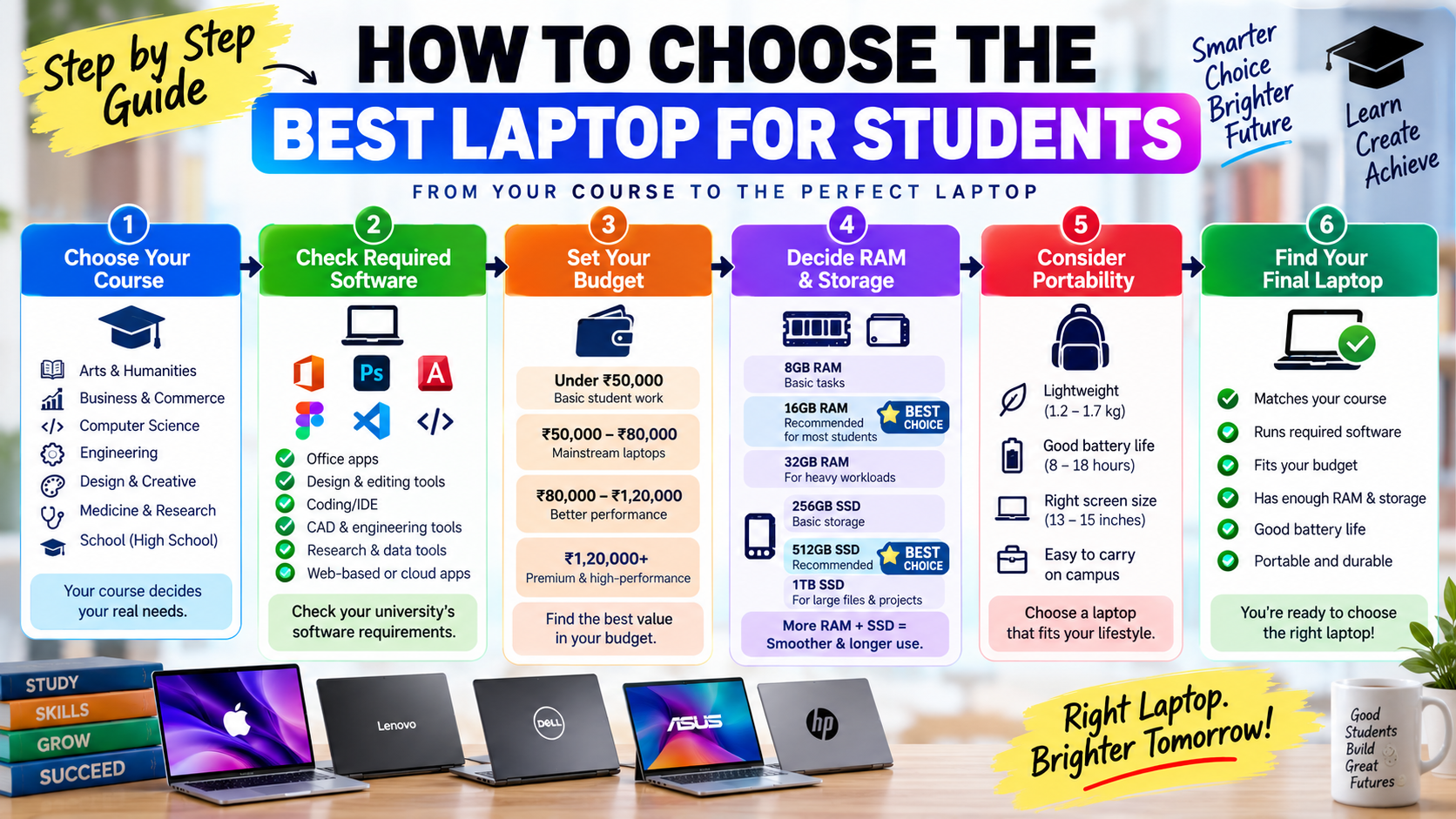
The simplest way to choose a student laptop is to start with your software requirements, set a budget, establish minimum specifications, and then compare models within those limits.
For example, if you are a computer science student, start with 16GB RAM and 512GB SSD, then determine whether your course requires virtualization or other demanding workloads.
Next, remove laptops that do not meet your software requirements. Then compare the remaining models by battery life, weight, display, keyboard, warranty, and price.
What’s Next? How Should You Choose Your Student Laptop?
Your next step should be to match your course requirements to a realistic laptop specification before comparing individual models and prices.
First, write down the software you expect to use during your course. Include programming environments, CAD applications, Adobe software, statistical tools, virtual machines, and any university-specific applications.
Second, choose your minimum specifications. For most students, 16GB RAM, 512GB SSD, a modern processor, and good battery life provide a strong starting point.
Third, decide whether portability or performance matters more. A 13- or 14-inch laptop makes sense for students who carry their computers all day, while a 15- or 16-inch model can be better for students who want a larger workspace.
Fourth, compare at least three laptops using the same criteria. Do not compare one model with 16GB RAM and 1TB storage against another with 8GB RAM and 256GB storage based only on headline price.
Finally, verify the current price and configuration immediately before purchasing because laptop pricing, promotions, stock, and configurations can change quickly.
Conclusion
The best laptops for students in 2026 balance performance, battery life, portability, software compatibility, and price rather than simply offering the most powerful hardware.
First, the MacBook Air M5 is an excellent all-round option for students who want premium portability and battery life, while the MacBook Neo offers a lower-cost path into Apple’s ecosystem. Windows alternatives such as the Surface Laptop 8, ASUS Zenbook 14, Lenovo IdeaPad Slim 5i, Dell XPS 13, and HP OmniBook 7 Aero cover a wider range of student preferences and workloads.
Moreover, your course should determine your final decision. A business student, computer science student, engineering student, and design student can all have completely different laptop requirements.
Finally, remember the most important rule: buy for your workload, not for the specification sheet. If you identify your software requirements, choose enough RAM and storage, prioritize battery life and portability, and compare equivalent configurations, you can find a laptop that supports your studies for years instead of simply buying the most expensive model available.



1 thought on “Best Laptops for Students in 2026 | Ultimate Guide to Choosing the Right Laptop for College”