
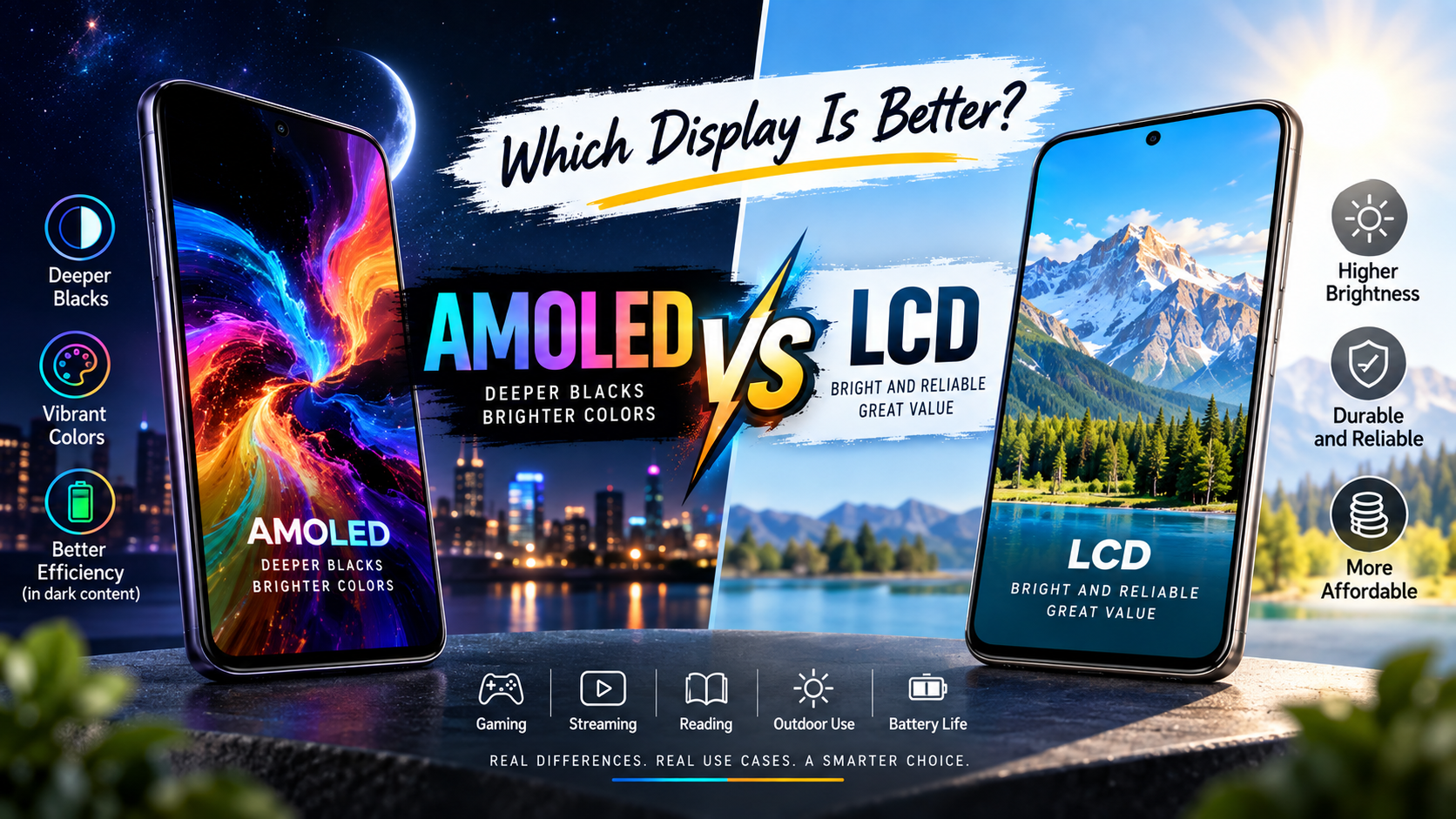
You’ve probably already noticed that premium smartphones increasingly use AMOLED displays while many affordable phones still use LCD screens. But the panel name alone does not tell you which screen will look better, last longer, use less power, or suit your daily routine. In this guide, we’ll explain AMOLED vs LCD in simple terms and compare picture quality, battery life, brightness, gaming, durability, price, and real-world use cases.
Key Takeaways
- AMOLED displays use self-emissive pixels, while LCD displays rely on a backlight to illuminate their pixels.
- AMOLED generally provides deeper blacks and higher contrast because individual pixels can switch off completely.
- LCD displays can offer excellent image quality and value, especially in affordable and mid-range devices.
- AMOLED can be more power-efficient when displaying dark content because dark pixels can be turned off, although actual savings depend on the device and content.
- AMOLED and LCD each have different strengths, so the better choice depends on brightness, viewing habits, price, durability, and device quality.
- Display quality depends on more than panel type, including brightness, refresh rate, resolution, color accuracy, HDR support, and calibration.
- Buyers should compare complete display specifications and real-world tests instead of choosing a device solely because it uses AMOLED or LCD.
What Is the Difference Between AMOLED and LCD Displays?
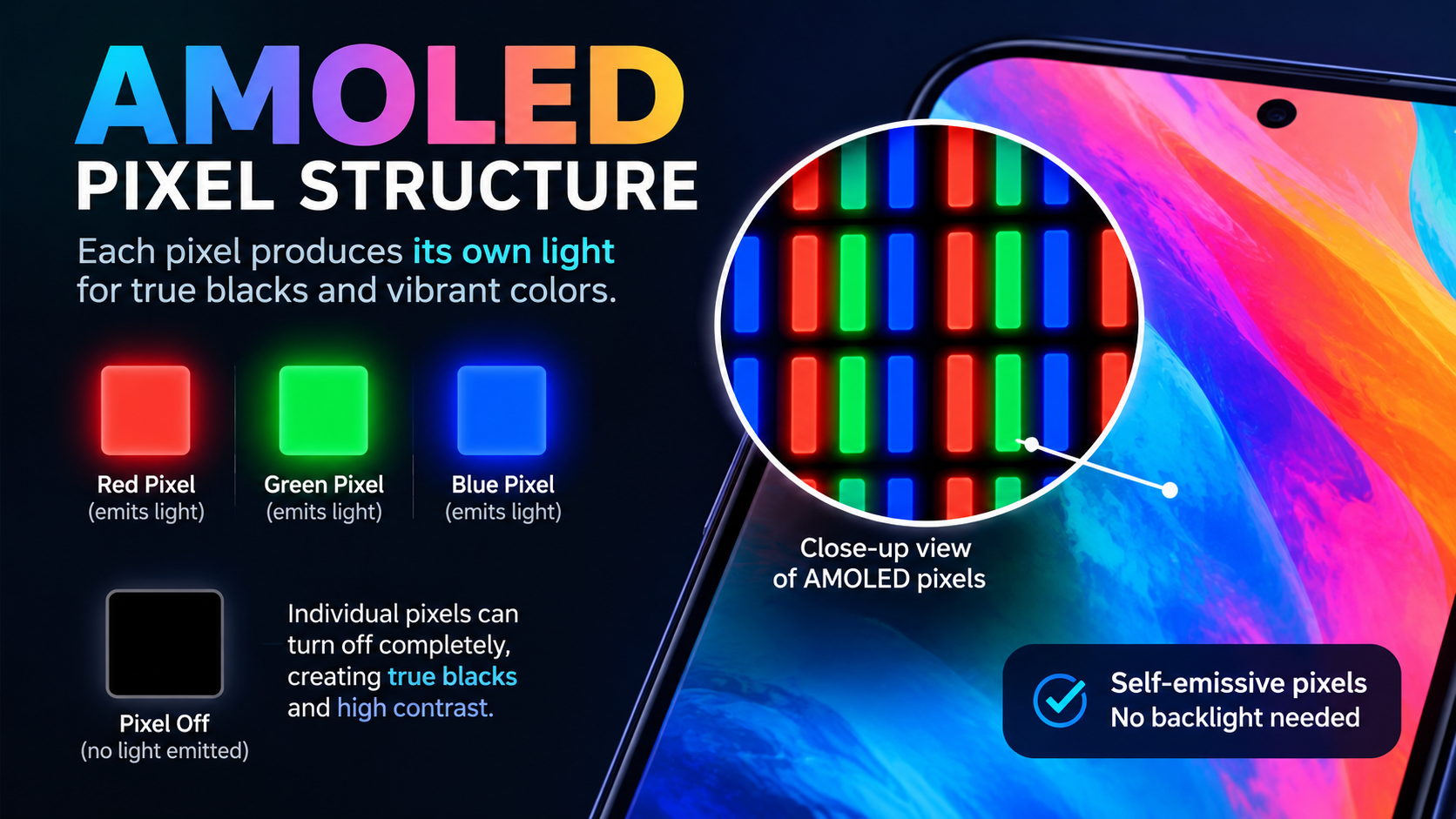
AMOLED is a display technology in which individual pixels produce their own light, while LCD is a display technology that uses a separate backlight behind the liquid-crystal layer.
First, this difference explains most of what you see when comparing the two technologies. AMOLED pixels can turn themselves on or off individually, while an LCD panel controls how much backlight passes through each pixel.
For example, when an AMOLED smartphone displays a completely black area, the relevant pixels can switch off. An LCD smartphone must still operate its backlight, even when the displayed image contains black areas.
| Feature | AMOLED | LCD |
|---|---|---|
| Pixel illumination | Self-emissive | Uses backlight |
| Black levels | Excellent | Good to moderate, depending on panel |
| Contrast | Typically very high | Depends heavily on LCD type |
| Viewing angles | Generally excellent | Good to excellent |
| Dark-mode efficiency | Can be very efficient | Backlight remains active |
| Burn-in risk | Possible with prolonged static content | No OLED-style pixel burn-in |
| Thickness | Can be very thin | Requires backlight layers |
| Typical positioning | Mid-range to premium | Budget to premium |
| Best known for | Blacks, contrast, premium visuals | Value, brightness, consistency |
Moreover, AMOLED is a type of OLED technology, while LCD is a fundamentally different display architecture. IPS LCD, for example, is a specific type of LCD panel rather than a separate category from LCD.
What Does AMOLED Mean?
AMOLED stands for Active-Matrix Organic Light-Emitting Diode. The technology uses organic light-emitting materials that produce light when electrically activated.
Next, the “active-matrix” part refers to the way individual pixels are controlled, while the OLED portion describes the light-emitting technology.
For example, a 120Hz AMOLED phone can independently control millions of pixels while showing videos, games, menus, and black backgrounds.
What Does LCD Mean?
LCD stands for Liquid Crystal Display and uses a backlight to illuminate pixels. The liquid-crystal layer controls how much light passes through each pixel to create the image.
Furthermore, modern LCD screens often use LED backlights, which is why you may see products marketed as “LED displays” even though the underlying image-forming technology is LCD.
For example, an IPS LCD smartphone can deliver accurate colors, high brightness, and a sharp Full HD+ image without using AMOLED technology.
Why Does AMOLED vs LCD Matter When Choosing a Device?
AMOLED vs LCD matters because display technology influences contrast, black levels, power consumption, viewing angles, design, and the overall visual experience.
First, the display is one of the components you interact with most on a smartphone, tablet, laptop, monitor, or television. A technically faster processor cannot compensate for a screen that does not suit your viewing habits.
For example, someone who watches movies at night may notice AMOLED’s deep blacks immediately, while someone working with static spreadsheets for many hours may value an LCD panel’s resistance to OLED-style burn-in.
Why Do Black Levels Matter?
Black levels describe how effectively a display can reproduce dark areas without producing unwanted light. AMOLED has a fundamental advantage because individual pixels can switch off.
For example, a black night sky can appear genuinely black on an AMOLED screen rather than slightly gray because the pixels producing that portion of the image are off.
RTINGS explains that OLED’s self-emissive pixels can produce very deep blacks because individual pixels can turn off completely.
Why Does Contrast Matter?
Contrast describes the difference between the darkest and brightest portions of an image. Strong contrast can make movies, photos, and games appear more dimensional.
Moreover, AMOLED’s ability to create very dark blacks gives it an important advantage in high-contrast scenes.
For example, a star field in a dark movie can show bright stars against a much darker background, creating a more dramatic image.
Why Does Display Technology Affect Battery Life?
Display technology can affect battery consumption because AMOLED pixels can switch off for black content, while an LCD backlight remains active.
However, battery savings are not guaranteed in every situation. Screen brightness, refresh rate, panel efficiency, software optimization, processor efficiency, and the amount of dark content all influence real-world battery life.
For example, a phone displaying a mostly white webpage at high brightness may not gain much from AMOLED’s ability to turn off black pixels.
How Does an AMOLED Display Work?
An AMOLED display works by using individually controlled organic light-emitting pixels instead of a separate backlight.
First, each pixel contains subpixels that can generate light when electrical current activates them. Because those pixels are individually controlled, the screen can create bright and dark areas with exceptional precision.
For example, when a black notification panel appears on an AMOLED smartphone, the pixels underneath that black region can remain off while nearby colored pixels continue producing light.
Samsung describes OLED displays as self-emissive because their pixels generate light independently instead of depending on a traditional backlight.
What Are the Main Advantages of AMOLED?
AMOLED’s main advantages are deep blacks, high contrast, wide viewing angles, thin designs, and strong motion performance.
First, individual pixel control gives AMOLED its most recognizable visual advantage. Dark scenes can look especially impressive because the display does not need to illuminate pixels that should appear black.
For example, watching a space movie in a dark room can reveal a noticeable difference between true black backgrounds and the dark-gray blacks produced by some LCD panels.
Moreover, OLED displays can offer very fast response times, which can benefit gaming and fast-moving content.
Samsung notes that OLED monitors can provide ultra-fast response times that are useful for fast-paced gaming.
What Are the Disadvantages of AMOLED?
AMOLED’s main disadvantages include potential burn-in, variable brightness behavior, and higher device costs in some product categories.
Next, burn-in occurs when repeated static elements cause uneven pixel aging, leaving persistent remnants of previously displayed content.
For example, a television or monitor that displays the same news logo, taskbar, or game interface for thousands of hours can be more susceptible to permanent image retention.
RTINGS’ long-term testing found that prolonged exposure to static content can cause burn-in on OLED displays, while the tested LCD TVs did not show the same type of burn-in.
That does not mean every AMOLED screen will develop burn-in. Modern devices use techniques such as pixel shifting, brightness management, and other compensation mechanisms to reduce risk.
However, users who keep static content on screen for extremely long periods should still consider the technology’s characteristics before buying.
How Does an LCD Display Work?
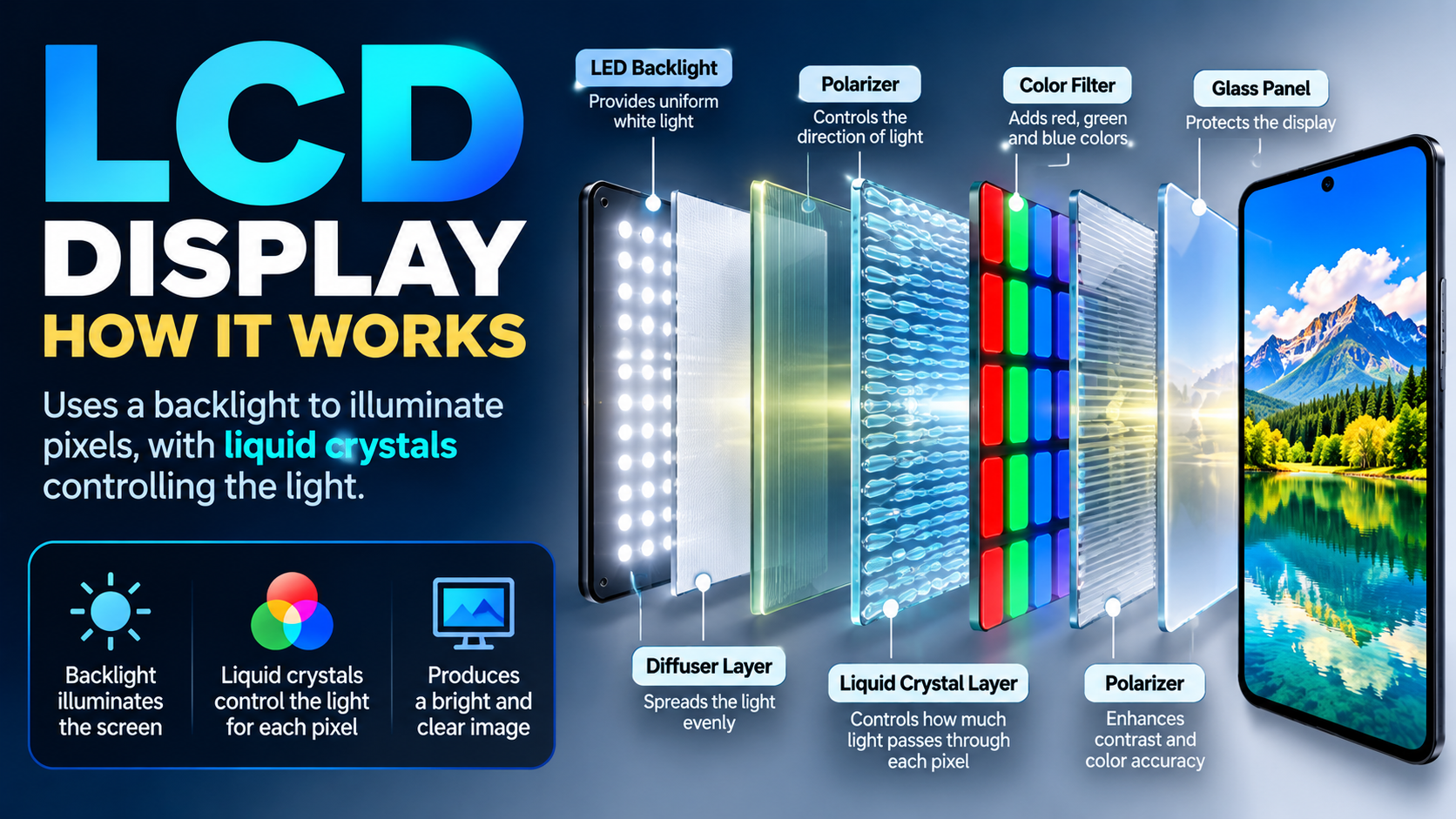
An LCD display works by using a backlight and a liquid-crystal layer to control how light passes through the screen.
First, the backlight provides the illumination that makes the display visible. The liquid-crystal layer then modulates that light, while color filters and other layers help create the final image.
For example, when an LCD phone displays a red icon, its liquid-crystal and color-filter layers control the backlight so the correct amount and color of light reaches your eyes.
IPS is one common LCD technology. IPS LCD panels are known for good viewing angles and can deliver strong color performance when properly calibrated.
What Are the Main Advantages of LCD?
LCD’s main advantages include strong value, mature manufacturing, consistent brightness, and no OLED-style pixel burn-in.
First, LCD technology has been used across smartphones, monitors, laptops, televisions, dashboards, and other products for years. This maturity makes it possible to build very capable displays across a wide range of prices.
For example, an affordable smartphone can use a good IPS LCD panel and still provide sharp text, natural colors, a high refresh rate, and strong outdoor brightness.
Moreover, LCD can be particularly attractive for users who spend long periods displaying static desktop interfaces.
RTINGS identifies IPS LCD as an alternative to OLED for users concerned about burn-in from static elements such as toolbars and other persistent interface components.
What Are the Disadvantages of LCD?
LCD’s main limitation compared with AMOLED is that its backlight prevents individual pixels from producing perfectly black output.
Next, even advanced LCD panels can struggle to reproduce blacks with the same precision as a self-emissive OLED display.
For example, a dark movie scene may appear slightly gray or show some backlight glow instead of producing a perfectly dark background.
However, LCD performance varies significantly between panel types. A high-quality VA LCD, for example, can have much stronger contrast than a basic IPS LCD, while premium LCD products can provide excellent brightness and color accuracy.
Is AMOLED Better Than LCD for Picture Quality?
AMOLED generally has an advantage in picture quality because it can produce deeper blacks, very high contrast, and precise pixel-level lighting.
First, picture quality is not determined by panel technology alone. Resolution, color calibration, brightness, viewing environment, HDR implementation, pixel density, and image processing also matter.
For example, a poorly calibrated AMOLED display can look less accurate than a well-calibrated LCD display even though AMOLED has a technological advantage in black levels.
Which Display Has Better Colors?
AMOLED can produce highly vibrant colors, but color accuracy depends on calibration rather than panel technology alone.
Moreover, modern displays often include different color modes, such as vivid and natural profiles.
For example, a phone configured in a saturated display mode may make social-media photos appear more dramatic while reducing color accuracy compared with a calibrated natural mode.
Therefore, do not assume that every AMOLED screen automatically has better color accuracy than every LCD screen.
Which Display Has Better Contrast?
AMOLED generally wins contrast because individual pixels can turn completely off.
For example, white text displayed against a black background can appear especially striking on AMOLED because the surrounding pixels can remain off.
This advantage becomes more noticeable in dark environments and HDR content.
RTINGS describes OLED as having an advantage in contrast because self-emissive pixels can produce perfect blacks in dark-room conditions.
Which Display Is Brighter: AMOLED or LCD?
Neither technology is universally brighter because maximum brightness depends heavily on the specific panel and how brightness is measured.
First, peak brightness and sustained full-screen brightness are different measurements. A display can produce an extremely bright small highlight without maintaining the same brightness across the entire screen.
For example, an AMOLED television may produce a very bright HDR highlight while an LCD television may maintain higher brightness across a large white area.
Recent RTINGS testing shows that modern OLED displays have become substantially brighter, but LCD technology can still retain an advantage in sustained full-screen brightness.
Therefore, buyers should check measured brightness in nits, preferably both peak and sustained brightness, instead of assuming AMOLED or LCD automatically wins.
Is AMOLED Better Than LCD for Battery Life?
AMOLED can be more power-efficient than LCD when displaying dark content because black AMOLED pixels can be switched off.
First, this advantage depends on what appears on the screen. AMOLED does not automatically consume less power in every situation.
For example, a smartphone using dark mode with large black backgrounds can take advantage of AMOLED’s pixel-level power control, while a bright white webpage requires many AMOLED pixels to remain illuminated.
At the same time, an LCD’s backlight remains active regardless of whether the image contains black or white areas.
Does Dark Mode Save Battery on AMOLED?
Dark mode can reduce display power consumption on some AMOLED devices because black pixels can remain off.
For example, a mostly black settings screen can use less display power than an equally bright white interface on an AMOLED phone.
However, the actual savings depend on the display’s construction, brightness, software, and the amount of genuinely black content.
Therefore, dark mode should be treated as a potential efficiency benefit rather than a guaranteed percentage of battery savings.
Is AMOLED Better Than LCD for Gaming?
AMOLED is often better for gaming when deep blacks, contrast, fast response, and immersive visuals are the priorities.
First, gaming benefits from more than panel technology. Refresh rate, response time, touch sampling, input latency, brightness, thermal behavior, and adaptive refresh technology can all influence the experience.
For example, a 120Hz AMOLED smartphone can provide smooth motion and strong contrast in dark games, but a 165Hz LCD gaming monitor may provide a higher refresh rate at a lower price.
RTINGS notes that OLED monitors generally provide superior motion performance, while LCD panels can still offer advantages such as text clarity and freedom from burn-in.
Is AMOLED Better for Movies and Netflix?
AMOLED is particularly well suited to movies and streaming because its deep blacks and high contrast can improve dark scenes.
For example, a nighttime scene with black letterbox bars can look more immersive when the display can turn off the pixels in those areas.
However, an LCD with strong contrast, high brightness, and good local dimming can also deliver an excellent movie-watching experience.
Is AMOLED or LCD Better for Reading and Productivity?
LCD can be an excellent choice for reading and productivity, particularly when long static content and text clarity are priorities.
First, productivity involves displaying interfaces that can remain unchanged for hours, including browser tabs, spreadsheets, menus, and taskbars.
For example, a desktop monitor used for eight hours of office work may display the same toolbar and window elements for long periods, making burn-in considerations more relevant for OLED.
Text rendering also depends on pixel layout and pixel density. RTINGS notes that some OLED monitor subpixel layouts can produce text fringing compared with conventional RGB layouts used by many IPS LCD displays.
That does not make AMOLED or OLED unsuitable for productivity. It simply means you should evaluate the specific display rather than choosing based on technology alone.
Does AMOLED Have More Burn-In Problems Than LCD?
AMOLED and other OLED displays have a permanent burn-in risk that conventional LCD displays generally do not have in the same way.
First, burn-in is different from temporary image retention. Burn-in results from uneven long-term pixel aging, while temporary retention can disappear after the displayed content changes.
For example, a temporary logo ghost may disappear within minutes, whereas a permanently retained logo caused by prolonged uneven aging can remain visible.
RTINGS’ current testing continues to identify burn-in as a consideration for OLED displays exposed to static content for very long periods.
Should You Avoid AMOLED Because of Burn-In?
You generally do not need to avoid AMOLED solely because of burn-in if your usage involves varied content.
For example, someone who watches YouTube, browses websites, plays different games, uses social media, and changes applications regularly has a different risk profile from someone who displays the same desktop interface for thousands of hours.
Modern OLED products also include software and hardware techniques designed to manage pixel aging.
Nevertheless, users with highly static workloads should consider LCD as a practical alternative.
AMOLED vs LCD: Side-by-Side Comparison
AMOLED generally wins black levels, contrast, and pixel-level control, while LCD remains highly competitive in brightness, value, and resistance to OLED-style burn-in.
| Category | AMOLED | LCD | Practical Winner |
|---|---|---|---|
| Black levels | Pixels can switch off | Backlight remains active | AMOLED |
| Contrast | Extremely high | Depends on LCD type | AMOLED |
| Colors | Excellent when calibrated | Excellent when calibrated | Tie |
| Brightness | Strong, varies by panel | Often strong sustained brightness | Depends |
| Viewing angles | Generally excellent | Good to excellent | AMOLED often |
| Battery with dark content | Potentially more efficient | Backlight stays active | AMOLED |
| Battery with bright content | Depends on implementation | Depends on implementation | Depends |
| Response time | Usually extremely fast | Varies by panel | AMOLED often |
| Burn-in | Possible | No OLED-style burn-in | LCD |
| Static desktop use | Requires consideration | Well suited | LCD |
| Thinness | Can be extremely thin | Requires backlight | AMOLED |
| Price | Often higher in premium products | Wide range | LCD often |
| HDR | Excellent contrast | Excellent on premium implementations | Depends |
| Gaming | Excellent motion and contrast | Excellent at high refresh rates | Depends |
| Overall value | Strong at premium tiers | Strong across budgets | Depends |
Which Display Has Better Viewing Angles?
AMOLED generally maintains strong image quality at wide viewing angles because each pixel produces its own light.
For example, watching a video while holding an AMOLED phone at an angle can preserve contrast and color better than some lower-quality LCD panels.
However, IPS LCD technology can also provide excellent viewing angles, so the exact panel implementation matters.
Which Display Has Better Response Time?
AMOLED generally offers extremely fast pixel response, which can reduce visible motion blur in fast-moving content.
For example, a fast racing game can look clearer during rapid camera movement when the display has very fast pixel transitions.
Still, refresh rate and response time are different specifications. A 120Hz LCD can still provide smoother motion than a 60Hz AMOLED display.
Which Display Is Better for HDR?
AMOLED can provide an excellent HDR experience because its pixel-level control produces very high contrast between bright highlights and dark areas.
For example, an HDR movie can show a bright streetlight against an almost completely black night sky.
However, HDR performance also depends on peak brightness, tone mapping, color volume, and content mastering. A high-end LCD with strong local dimming can therefore compete strongly with OLED in some environments.
When Should You Choose AMOLED Instead of LCD?
You should choose AMOLED when deep blacks, strong contrast, premium image quality, thin design, and dark-content efficiency are important to you.
First, AMOLED makes particular sense for users who spend significant time consuming visual content.
For example, consider AMOLED if you:
- Watch movies and streaming content frequently.
- Play visually rich games.
- Prefer dark mode.
- Want deep black levels.
- Value premium-looking displays.
- Want excellent viewing angles.
- Prefer thin and modern device designs.
- Regularly view HDR content.
Moreover, AMOLED can be especially attractive in smartphones because the screen is used for everything from photography to social media and video playback.
When Should You Choose LCD Instead of AMOLED?
You should choose LCD when value, sustained brightness, static-content use, or avoiding OLED-style burn-in is more important than perfect blacks.
First, a good LCD can deliver excellent everyday performance without the higher cost or burn-in considerations associated with OLED.
For example, LCD may be a sensible choice if you:
- Want an affordable smartphone.
- Use a monitor primarily for office work.
- Display static interfaces for long periods.
- Prefer consistent full-screen brightness.
- Want to minimize burn-in concerns.
- Find a particular LCD device has better overall specifications.
- Want strong value for money.
This is why the question “Is AMOLED better than LCD?” does not have one answer for every buyer.
What Should You Check Before Buying an AMOLED or LCD Device?
You should evaluate the complete display specification rather than choosing a device based only on whether it uses AMOLED or LCD.
First, check these specifications before buying:
- Brightness: Look for measured brightness in nits and distinguish peak from sustained brightness.
- Refresh rate: A higher refresh rate can improve scrolling and gaming smoothness.
- Resolution: Higher resolution generally provides more image detail at an appropriate screen size.
- Pixel density: Higher PPI can improve perceived sharpness.
- Color accuracy: Look for reliable measurements rather than marketing terms alone.
- HDR support: Check both HDR compatibility and actual HDR brightness.
- Contrast: Consider native contrast and local-dimming performance where applicable.
- Viewing angles: Check whether colors and brightness change when viewed from the side.
- Response time: Important for gaming and fast-moving content.
- Dimming behavior: PWM or other dimming methods may matter to users sensitive to display flicker.
- Screen protection: Check the specific glass or protective technology used.
- Warranty: Confirm whether the manufacturer provides coverage for display defects or burn-in.
For example, a 120Hz LCD with excellent brightness and calibration can be a better purchase than a 60Hz AMOLED if your priorities are gaming performance and outdoor visibility.
What Are the Best Practical Ways to Compare AMOLED and LCD?
The best way to compare AMOLED and LCD is to evaluate actual devices under the same brightness, content, viewing angle, and usage conditions.
First, marketing specifications can hide important differences between individual panels.
For example, compare two phones side by side while displaying the same black image, white webpage, HDR video, and fast-moving game.
A Simple Display Comparison Test
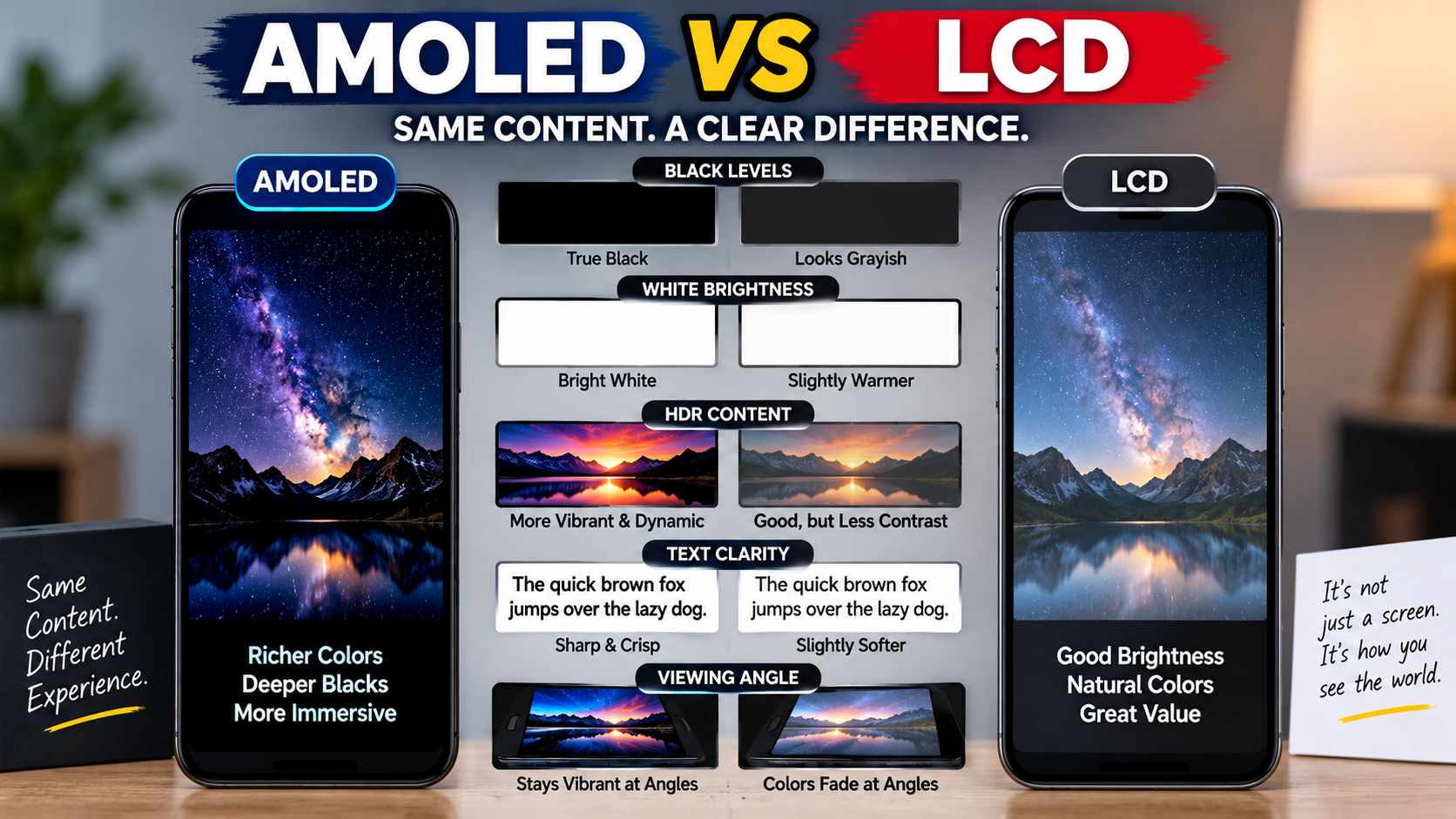
A practical display test should compare black levels, brightness, colors, viewing angles, motion, and text clarity using identical content.
Try this five-step process:
- Open a completely black image and compare how dark each screen appears.
- Open a white webpage and compare brightness and uniformity.
- Play HDR video and examine highlights and shadow detail.
- Scroll through text to evaluate smoothness and clarity.
- View both displays from an angle to check color and brightness changes.
Free tools and independent review sites can also help. For example, display-testing resources such as RTINGS provide measurements and long-term testing that can complement manufacturer specifications.
What’s Next: How Do You Choose the Right Display for You?
The right display depends on how you use your device, your budget, and which display characteristics matter most to you.
First, use your daily habits as the decision filter rather than choosing based on the technology label.
Choose AMOLED If You Prioritize Visual Quality
AMOLED is the stronger choice when deep blacks, high contrast, cinematic viewing, and premium visual quality are your main priorities.
For example, someone who watches Netflix every night and uses dark mode throughout the day may get more practical value from AMOLED’s strengths.
Choose LCD If You Prioritize Value and Static Use
LCD is the stronger choice when affordability, sustained brightness, and long periods of static content are major priorities.
For example, a student buying a budget smartphone or an office worker choosing a productivity monitor may find a high-quality LCD more than sufficient.
Compare the Whole Device
The display panel should be evaluated alongside the device’s brightness, refresh rate, resolution, battery, processor, software, and price.
For example, paying extra for AMOLED may not make sense if the LCD alternative has substantially higher brightness, a faster refresh rate, better battery life, and a lower price.
Conclusion
AMOLED and LCD are both capable display technologies, but they are optimized around different strengths rather than one being universally better.
First, AMOLED has a clear technological advantage in black levels, contrast, pixel-level lighting, viewing angles, and premium visual quality. Its ability to switch individual pixels off makes dark scenes particularly impressive and can improve efficiency when displaying dark content.
Second, LCD remains highly competitive because good LCD panels can deliver excellent brightness, color accuracy, sharpness, high refresh rates, and strong value without the OLED-style risk of permanent burn-in.
The most important lesson is simple: do not buy a device just because its specifications say AMOLED or LCD.
Instead, compare brightness, refresh rate, resolution, color accuracy, HDR performance, contrast, viewing angles, response time, durability, price, and independent testing.
So, which display is better?
For movies, gaming, dark-mode users, and premium visual experiences, AMOLED is often the better fit. For budget-focused buyers, static productivity use, sustained brightness, and users who want to avoid OLED burn-in concerns, LCD can be the smarter choice.
Ultimately, AMOLED and LCD complement different user needs. The best display is not the one with the most impressive technology name; it is the one that delivers the right combination of quality, performance, reliability, and value for the way you actually use your device.

1 thought on “AMOLED vs LCD: Which Display Is Better? 2026”